

 Javascript validator
Javascripts
Javascript validator
Javascripts
|
|
11.5 Creating a Data GridYou are now ready to return to the data grid examples from Chapter 10 and recode them by accessing the database. You will remember that in Example 10-7 and Example 10-8, you created a simple data grid, and then populated it with data from an ArrayList object. You can re-create that now using ADO.NET to get bug data from the database. To start, create a new C# project, SimpleADODataGrid. Drag a DataGrid control onto the form, Visual Studio will name it DataGrid1. Accept all the default attributes as offered. In the code-behind page's Page_Load method, you get the Bugs table from the database, just as you did in Example 11-3: string connectionString = "server=YourServer; uid=sa; " + "pwd=YourPassword; database=ProgASPDotNetBugs"; // get records from the Bugs table string commandString = "Select BugID, Description from Bugs"; // create the dataset command object // and the DataSet SqlDataAdapter dataAdapter = new SqlDataAdapter( commandString, connectionString); DataSet dataSet = new DataSet( ); // fill the dataset object dataAdapter.Fill(dataSet,"Bugs"); // Get the one table from the DataSet DataTable dataTable = dataSet.Tables[0]; This time, however, you'll bind to the data grid rather than to a list box. To do so, you set the DataGrid control's DataSource property to dataTable, the DataTable object you get from the dataset, and then call DataBind on the data grid: DataGrid1.DataSource=dataTable; DataGrid1.DataBind( ); When you run the page, hey! presto! the data grid is connected, as shown in Figure 11-8. Figure 11-8. A simple data grid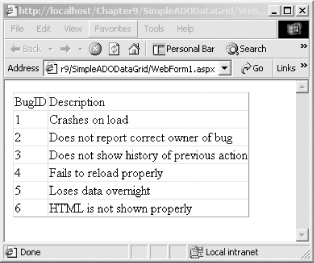 Notice that the columns in the data grid have titles. These are the names of the columns from the Bugs table. Unless you tell it otherwise, the data grid picks up the titles from the columns in the database. You'll see how to modify this in a later example. 11.5.1 Displaying Relational DataIf you change the commandString in Example 11-2 from: string commandString = "Select BugID, Description from Bugs"; to: string commandString = "Select * from Bugs"; to get all the fields in the table, the output (shown in Figure 11-9) reflects the fact that some of the fields have numeric IDs that do not convey a lot of information to the user. Figure 11-9. Showing the ID fields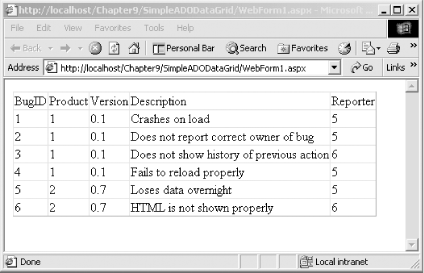 The information you would like to show is the name of the product and the name of the person filing the report. You accomplish this by using a more sophisticated SQL select statement in the command string: string commandString = "Select b.BugID, b.Description, p.ProductDescription, peo.FullName from Bugs b join lkProduct p on b.Product = p.ProductID join People peo on b.Reporter = peo.PersonID "; In this select statement, you are drawing fields from three tables: Bugs, lkProduct, and People. You join the lkProduct table to the Bugs table on the ProductID in the Bugs record, and you join the People table to the PersonID of the Reporter field in Bugs. The results are shown in Figure 11-10. Figure 11-10. Using the join statement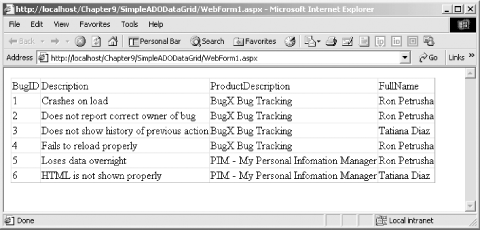 This is better, but the headers are not what we might hope, and the grid is a bit ugly. The best way to solve these problems is with attributes for the DataGrid, as you saw in Chapter 10. Adding just a few attributes to the data grid, you can control which columns are displayed and how the headers are written, and you can provide a nicer background color for the header row. The following code does this: <asp:DataGrid id="DataGrid1" runat="server" CellPadding="5"
HeaderStyle-BackColor="PapayaWhip" BorderWidth="5px"
BorderColor="#000099" AlternatingItemStyle-BackColor="LightGrey"
HeaderStyle-Font-Bold="True" AutoGenerateColumns="False">
<Columns>
<asp:BoundColumn DataField="BugID" HeaderText="ID" />
<asp:BoundColumn DataField="Description"
HeaderText="Description" />
<asp:BoundColumn DataField="ProductDescription"
HeaderText="Product" />
<asp:BoundColumn DataField="FullName"
HeaderText="Reported By" />
</Columns>
</asp:DataGrid>
You will remember from Chapter 10 that the AutoGenerateColumns attribute tells the grid whether to pick up all the columns from the data source; by setting it to false, you tell the grid that you will specify which columns to display in the Columns attribute. Nested within the Columns attribute are BoundColumn attributes, which delineate which field will supply the data (e.g., BugID, ProductDescription, FullName) and the header to display in the DataGrid (e.g., BugID, Product, Reported By). The result is shown in Figure 11-11. Figure 11-11. Using attributes to control the display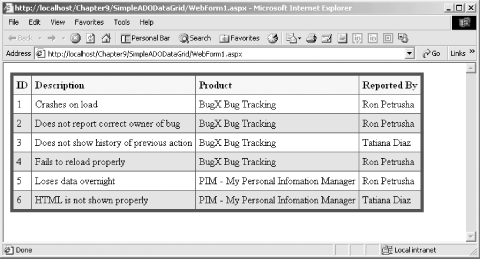 11.5.2 Displaying Parent/Child RelationshipsYou would like to offer the user the ability to see the complete history for a given Bug. To do this, you'll add a column with a button marked "History." When the user clicks on the button, you'll display a second grid with the Bug History. The BugHistory records act as child records to the Bug records. For each Bug there will be a set of one or more BugHistory records. For each BugHistory record there will be exactly one Bug parent record. This section will explore the first of a number of ways to display these related records. Alternative ways to display this relationship will be shown later in this chapter. To start, add the ButtonColumn to the Data Grid and add an attribute for the OnSelectedIndexChanged event. Set the DataKeyField attribute to BugID; this is the primary key for the Bugs table and will serve as the foreign key for the BugHistory grid: <asp:DataGrid id="DataGrid1" runat="server" DataKeyField="BugID" CellPadding="5" HeaderStyle-BackColor="PapayaWhip" BorderWidth="5px" BorderColor="#000099" OnItemDataBound="OnItemDataBoundEventHandler" OnSelectedIndexChanged="OnSelectedIndexChangedHandler" AlternatingItemStyle-BackColor="LightGrey" HeaderStyle-Font-Bold="True" AutoGenerateColumns="False" EnableViewState="true"> <Columns> <asp:ButtonColumn Text="History" CommandName="Select" /> <asp:BoundColumn DataField="BugID" HeaderText="Bug ID" /> <asp:BoundColumn DataField="Description" HeaderText="Description" /> <asp:BoundColumn DataField="Reporter" HeaderText="Reported By" /> <asp:BoundColumn DataField="Response" HeaderText="Most Recent Action" /> <asp:BoundColumn DataField="Owner" HeaderText="Owned By" /> <asp:BoundColumn DataField="StatusDescription" HeaderText="Status" /> <asp:BoundColumn DataField="SeverityDescription" HeaderText="Severity" /> <asp:BoundColumn DataField="DateStamp" HeaderText="LastUpdated" /> </Columns> </asp:DataGrid> Add a Panel control to hold the history grid. This serves the same purpose as the details panel in Example 10-11; you'll make this panel visible or invisible depending on whether or not you are showing the history of a bug. Add the following code to the HTML page: <asp:Panel ID="BugHistoryPanel" Runat="server">
<asp:DataGrid id="HistoryGrid" AutoGenerateColumns="False"
HeaderStyle-Font-Bold="True" AlternatingItemStyle-BackColor="LightGrey"
BorderColor="#000099" BorderWidth="5px"
HeaderStyle-BackColor="PapayaWhip"
CellPadding="5" Runat="server">
<Columns>
<asp:BoundColumn DataField="Response"
HeaderText="Most Recent Action" />
<asp:BoundColumn DataField="Owner"
HeaderText="Owned By" />
<asp:BoundColumn DataField="StatusDescription"
HeaderText="Status" />
<asp:BoundColumn DataField="SeverityDescription"
HeaderText="Severity" />
<asp:BoundColumn DataField="DateStamp"
HeaderText="LastUpdated" />
</Columns>
</asp:DataGrid>
</asp:Panel>
The supporting code-behind page is shown in Example 11-6 for C# and Example 11-7 for VB.NET. Complete analysis follows the listings. Example 11-6. C# code-behind pageusing System;
using System.Collections;
using System.ComponentModel;
using System.Data;
using System.Data.SqlClient;
using System.Drawing;
using System.Text;
using System.Web;
using System.Web.SessionState;
using System.Web.UI;
using System.Web.UI.WebControls;
using System.Web.UI.HtmlControls;
namespace BugHistoryDynamic
{
/// <summary>
/// Summary description for WebForm1.
/// </summary>
public class WebForm1 : System.Web.UI.Page
{
protected System.Web.UI.WebControls.DataGrid DataGrid1;
protected System.Web.UI.WebControls.DataGrid HistoryGrid;
protected System.Web.UI.WebControls.Panel BugHistoryPanel;
public WebForm1( )
{
Page.Init += new System.EventHandler(Page_Init);
}
// When the item is added to the bug grid,
// if the status is high write it in red
public void OnItemDataBoundEventHandler(
Object sender, DataGridItemEventArgs e)
{
ListItemType itemType = (ListItemType)e.Item.ItemType;
if (itemType == ListItemType.Header ||
itemType == ListItemType.Footer ||
itemType == ListItemType.Separator)
return;
if (((DataRowView)e.Item.DataItem).
Row.ItemArray[8].ToString( ) == "High")
{
TableCell severityCell =
(TableCell) e.Item.Controls[6];
severityCell.ForeColor = Color.FromName("Red");
}
}
// the user has selected a row
// display the history for that bug
public void OnSelectedIndexChangedHandler(
Object sender, EventArgs e)
{
UpdateBugHistory( );
}
// If the user has selected a row
// display the history panel
private void UpdateBugHistory( )
{
int index = DataGrid1.SelectedIndex;
if (index != -1)
{
// get the bug id from the data grid
int bugID =
(int) DataGrid1.DataKeys[index];
// Get a dataset based on that BugID
DataSet dataSet =
CreateBugHistoryDataSet(bugID);
// bind to the table returned and make
// the panel visible
HistoryGrid.DataSource=dataSet.Tables[0];
HistoryGrid.DataBind( );
BugHistoryPanel.Visible=true;
}
else
{
// no history to display, hide the panel
BugHistoryPanel.Visible=false;
}
}
// The first time you load the page, populate the
// bug grid and hide the history grid
private void Page_Load(
object sender, System.EventArgs e)
{
if (!IsPostBack)
{
// hide the history panel
UpdateBugHistory( );
// set the data source for the
// grid to the first table
DataSet ds = CreateBugDataSet( );
DataGrid1.DataSource=ds.Tables[0];
DataGrid1.DataBind( );
}
}
// create a dataset for the bug history records
private DataSet CreateBugHistoryDataSet(int bugID)
{
// connection string to connect to the Bugs Database
string connectionString =
"server=YourServer; uid=sa; " +
"pwd=YourPassword; database=ProgASPDotNetBugs";
// Create connection object, initialize with
// connection string. Open it.
System.Data.SqlClient.SqlConnection connection =
new System.Data.SqlClient.SqlConnection(connectionString);
connection.Open( );
// create a second command object for the bugs history table
System.Data.SqlClient.SqlCommand command =
new System.Data.SqlClient.SqlCommand( );
command.Connection = connection;
StringBuilder s =
new StringBuilder("Select BugID, StatusDescription, ");
s.Append("SeverityDescription, Response, ");
s.Append("FullName as Owner, DateStamp ");
s.Append("from BugHistory h ");
s.Append("join People o on h.Owner = o.PersonID ");
s.Append("join lkStatus s on s.statusid = h.status ");
s.Append(
"join lkSeverity sev on sev.SeverityID = h.severity ");
s.Append("where BugID = " + bugID);
command.CommandText= s.ToString( );
// create a second data adapter and add the command
// and map the table
// then fill the dataset from this second adapter
SqlDataAdapter dataAdapter = new SqlDataAdapter(  );
dataAdapter.SelectCommand = command;
dataAdapter.TableMappings.Add("Table", "BugHistory");

DataSet dataSet = new DataSet(  );
dataAdapter.Fill(dataSet);
return dataSet;
}
// create a dataset for the bug table
private DataSet CreateBugDataSet( )
{
// connection string to connect to the Bugs Database
string connectionString =
"server=YourServer; uid=sa; " +
"pwd=YourPassword; database=ProgASPDotNetBugs";
// Create connection object, initialize with
// connection string. Open it.
System.Data.SqlClient.SqlConnection connection =
new System.Data.SqlClient.SqlConnection(connectionString);
connection.Open( );
// Create a SqlCommand object and assign the connection
System.Data.SqlClient.SqlCommand command =
new System.Data.SqlClient.SqlCommand( );
command.Connection=connection;
// build the selection statement
StringBuilder s =
new StringBuilder(
"Select b.BugID, h.BugHistoryID, b.Description,h.Response, ");
s.Append("o.FullName as owner, ");
s.Append("p.ProductDescription, ");
s.Append("r.FullName as reporter, ");
s.Append("s.StatusDescription, ");
s.Append("sev.SeverityDescription, ");
s.Append("h.DateStamp ");
s.Append("from ");
s.Append(
"(select bugID, max(bugHistoryID) as maxHistoryID ");
s.Append("from BugHistory group by bugID) t ");
s.Append("join bugs b on b.bugid = t.bugid ");
s.Append(
"join BugHistory h on h.bugHistoryID = t.maxHistoryID ");
s.Append("join lkProduct p on b.Product = p.ProductID ");
s.Append("join People r on b.Reporter = r.PersonID ");
s.Append("join People o on h.Owner = o.PersonID ");
s.Append("join lkStatus s on s.statusid = h.status ");
s.Append(
"join lkSeverity sev on sev.SeverityID = h.severity ");
// set the command text to the select statement
command.CommandText=s.ToString( );
// create a data adapter and assign the command object
// and add the table mapping for bugs
SqlDataAdapter dataAdapter = new SqlDataAdapter( );
dataAdapter.SelectCommand=command;
dataAdapter.TableMappings.Add("Table","Bugs");
// Create the dataset and use the data adapter to fill it
DataSet dataSet = new DataSet( );
dataAdapter.Fill(dataSet);
return dataSet;
}
private void Page_Init(object sender, EventArgs e)
{
InitializeComponent( );
}
#region Web Form Designer generated code
/// <summary>
/// Required method for Designer support - do not modify
/// the contents of this method with the code editor.
/// </summary>
private void InitializeComponent( )
{
this.Load += new System.EventHandler(this.Page_Load);
}
#endregion
}
}
Example 11-7. B.NET code-behind pageImports System
Imports System.Web
Imports System.Web.UI
Imports System.Web.UI.WebControls
Imports System.Data
Public Class WebForm1
Inherits System.Web.UI.Page
Protected WithEvents DataGrid1 As _
System.Web.UI.WebControls.DataGrid
Protected WithEvents HistoryGrid As _
System.Web.UI.WebControls.DataGrid
Protected WithEvents BugHistoryPanel As _
System.Web.UI.WebControls.Panel
#Region " Web Form Designer Generated Code "
'This call is required by the Web Form Designer.
<System.Diagnostics.DebuggerStepThrough( )> Private Sub InitializeComponent( )
End Sub
Private Sub Page_Init(ByVal sender As System.Object, _
ByVal e As System.EventArgs) _
Handles MyBase.Init
'CODEGEN: This method call is required by the Web Form Designer
'Do not modify it using the code editor.
InitializeComponent( )
End Sub
#End Region
Private Sub Page_Load( _
ByVal sender As System.Object, _
ByVal e As System.EventArgs) Handles MyBase.Load
'Put user code to initialize the page here
If Not IsPostBack Then
UpdateBugHistory( )
Dim ds As DataSet = CreateBugDataSet( )
DataGrid1.DataSource = ds.Tables(0)
DataGrid1.DataBind( )
End If
End Sub
Public Sub DataGrid1_ItemDataBound( _
ByVal sender As Object, _
ByVal e As System.Web.UI.WebControls.DataGridItemEventArgs) _
Handles DataGrid1.ItemDataBound
Dim myItemtype As ListItemType
myItemtype = CType(e.Item.ItemType, ListItemType)
If (myItemtype = ListItemType.Header) _
Or (myItemtype = ListItemType.Footer) _
Or (myItemtype = ListItemType.Separator) Then
Return
End If
Dim obj As Object = _
CType(e.Item.DataItem, DataRowView).Row.ItemArray(8)
If CType(e.Item.DataItem, DataRowView).Row.ItemArray(8).ToString( )_
= "High" Then
Dim severityCell As TableCell = _
CType(e.Item.Controls(6), TableCell)
severityCell.ForeColor = Color.FromName("Red")
End If
End Sub
Private Function CreateBugHistoryDataSet(ByVal bugID As Integer) _
As DataSet
Dim connectionString As String = _
"server=YourServer; uid=sa; pwd=YourPassword; " + _
"database=ProgASPDotNetBugs"
Dim connection As _
New System.Data.SqlClient.SqlConnection(connectionString)
connection.Open( )
Dim command As New System.Data.SqlClient.SqlCommand( )
command.Connection = connection
Dim s As New String( _
"Select BugID, StatusDescription, severityDescription, ")
s = s & "Response, FullName as owner, DateStamp from BugHistory h "
s = s & "join People p on h.owner = p.personID "
s = s & "join lkStatus s on s.statusid = h.status "
s = s & "join lkSeverity sev on sev.severityID = h.severity "
s = s & "where bugid = " & bugID
command.CommandText = s
Dim myDataAdapter As New SqlClient.SqlDataAdapter( )
myDataAdapter.SelectCommand = command
myDataAdapter.TableMappings.Add("Table", "BugHistory")
Dim ds As New DataSet( )
myDataAdapter.Fill(ds)
Return ds
End Function
Private Function CreateBugDataSet( ) As DataSet
Dim connectionString As String = _
"server=YourServer; uid=sa; pwd=YourPassword; " + _
"database=ProgASPDotNetBugs"
Dim connection As _
New System.Data.SqlClient.SqlConnection(connectionString)
connection.Open( )
Dim command As New System.Data.SqlClient.SqlCommand( )
command.Connection = connection
Dim s As New String( _
"Select b.bugID, h.bugHistoryID, b.description, h.response, ")
s = s & "o.Fullname as owner, p.ProductDescription, "
s = s & "r.FullName as reporter, "
s = s & "s.statusDescription, sev.SeverityDescription, h.DateStamp "
s = s & "from (select bugID, max(bugHistoryID) as maxHistoryID "
s = s & "from BugHistory group by bugID) t "
s = s & "join bugs b on b.bugid = t.bugID "
s = s & "join BugHistory h on h.bugHistoryID = t.maxHistoryID "
s = s & "join lkProduct p on b.Product = p.ProductID "
s = s & "join People r on b.Reporter = r.PersonID "
s = s & "join People o on h.Owner = o.PersonID "
s = s & "join lkStatus s on s.statusid = h.status "
s = s & "join lkSeverity sev on sev.SeverityID = h.severity "
command.CommandText = s
Dim myDataAdapter As New SqlClient.SqlDataAdapter( )
myDataAdapter.SelectCommand = command
myDataAdapter.TableMappings.Add("Table", "Bugs")
Dim ds As New DataSet( )
myDataAdapter.Fill(ds)
Return ds
End Function
Public Sub DataGrid1_SelectedIndexChanged( _
ByVal sender As Object, _
ByVal e As System.EventArgs) _
Handles DataGrid1.SelectedIndexChanged
UpdateBugHistory( )
End Sub
Private Sub UpdateBugHistory( )
Dim index As Integer = DataGrid1.SelectedIndex
If index <> -1 Then
Dim bugID As Integer = _
CType(DataGrid1.DataKeys(index), Integer)
Dim myDataSet As DataSet = CreateBugHistoryDataSet(bugID)
HistoryGrid.DataSource = myDataSet.Tables(0)
HistoryGrid.DataBind( )
BugHistoryPanel.Visible = True
Else
BugHistoryPanel.Visible = False
End If
End Sub
End Class
The Page_Load event handler creates the dataset for the bug grid the first time the page is viewed (that is, the IsPostBack property is false). When the user clicks on the History button, the OnSelectedIndexChangedHandler event fires. You call a private method, UpdateBugHistory, that determines if the Panel control should be shown or not. UpdateBugHistory checks the SelectedIndex property from the DataGrid. If the value of SelectedIndex is not -1 (that is, if a selection has been made), the index is used as an offset into the DataGrid's DataKeys collection. The dataset itself is created by the CreateBugHistoryDataSet method into which you pass the bugID as a parameter. This method formulates an SQL select statement and fills a dataset with the resulting records. When you first display the page, only the Bug data grid is displayed, as shown in Figure 11-12. Figure 11-12. Displaying the Bug DataGrid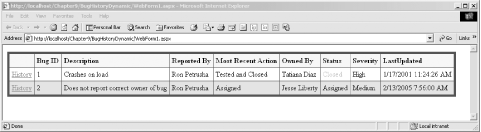 If the user clicks on the History button, you retrieve the index of the item clicked on and use that as an offset into the Datakeys collection to get the BugID. With the BugID, you can create a dataset of the matching history records, which is displayed in the HistoryDataGrid in the BugHistoryPanel that you now make visible, as shown in Figure 11-13. Figure 11-13. Displaying the bug history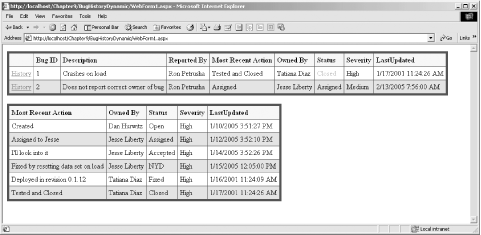 11.5.3 Using a DataReaderIn the previous example, the BugHistory grid was filled from a table in a dataset. While datasets are very powerful disconnected data sources, they may require more overhead than is needed in this example. If what you want to do is to retrieve a set of records and then immediately display them, an SqlDataReader or an OleDbDataReader object may be more efficient. DataReaders are very limited compared to datasets. They offer only a "firehose" cursor for forward-only iteration through a set of results. You can also use DataReaders to execute a simple insert, update, or delete SQL statement. Because datasets have greater overhead than DataReaders, you should choose a DataReader as your data source whenever possible. DataReaders are not disconnected, however, and so you lose the specific advantages of disconnected datasets. You will certainly need a dataset to meet any of the following requirements:
When you have simpler requirements, however, the DataReader object is a great lightweight alternative to the more complicated dataset. Rewriting the previous example to use a DataReader is almost trivial. You'll modify the CreateBugHistoryDataSet method to return an SqlDataReader object rather than a dataset. To get started, set up the connection string, SqlConnection object, and SqlCommand object exactly as you did previously. Once your Command object is established, create the DataReader. You cannot call the DataReader's constructor directly; instead you call ExecuteReader on the SqlCommand object; what you get back is an instance of SqlDataReader, as the following code fragment shows: SqlDataReader reader = command.ExecuteReader(CommandBehavior.CloseConnection); The optional CommandBehavior.CloseConnection argument is an enumerated value that tells the SqlDataReader object that when it is closed, it should close the connection to the database. You can then assign that SqlDataReader object as the DataSource for your DataGrid: HistoryGrid.DataSource=reader; After you bind the DataGrid, you must call Close on the SqlDataReader to tell it to break the connection to the database: HistoryGrid.DataBind( ); reader.Close( ); That's all there is to it. To modify Example 11-6 to use SqlDataReader, make the following three changes:
Recompile and the program will now use a (connected forward-only firehose) SqlDataReader rather than a (disconnected) SqlDataSet to bind the Bug History data grid. 11.5.4 DataViewIn Example 11-6, you query the database for the history records each time you redraw the history grid. An alternative is to retrieve all of the history records once, and then to filter the results to retrieve the history records you want to display. In a larger database, this might become unwieldy, but, for example, you might fill the Bugs table with just the 50 most recent bugs, and you would then fill the history table with the history records for just those 50 bugs. In this way you can reduce the number of calls to the database, in exchange for holding many more records in memory. To make this work, you'll assign the historyGrid's data source to a DataView object, rather than to a table. The DataView object will represent a "view" of the table, typically filtered by the particular bug of interest. You can revise the previous example by getting all the BugHistory records at the same time that you get all the bug records. You'll put the Bug records into one table in the dataset, and the BugHistory records into a second table in the dataset. When the page is first created, you'll create a DataView object based on the second table (BugHistory), and you'll make that view be the DataSource for the HistoryGrid: DataView historyView = new DataView(ds.Tables[1]); HistoryGrid.DataSource = historyView; When the user clicks on a record you will once again get the BugID by using the selected row as an index into the DataGrid object's DataKeys collection. This time, however, you will use that bugID to filter the view you've created: historyView.RowFilter = "BugID = " + bugID; The RowFilter property of the DataView object allows you to filter the view for those records you want. The view will only present records which match the filter. RowFilters use the SQL syntax of a where clause. The RowFilter above equates to the clause "where BugID = 2". Unfortunately, your class is destroyed and re-created each time the page is posted. Your historyView object will not persist, even if you were to make it an instance variable of the WebForm1 class. You could, of course, re-create the view by reissuing the query, but this would undermine the point of getting the entire set of history records in the first place. In a production system, you might get the view from outside your application. For example, you might be interacting with a web service that provides the DataView. In this example, since you don't have such a web service, you'll stash the DataView into the session state.
To save the DataView in session state, you just create a "key"В—506a string which will be used to identify your session state variable: Session["historyView"] = historyView; Here the DataView object historyView is saved to session state with the string "historyView" as its key. Session variables act like properties; you can simply assign them to an object, remembering to cast to the appropriate type: DataView historyView = (DataView) Session["historyView"]; 11.5.5 Creating Data RelationsBecause the DataSet acts as a disconnected model of the database, it must be able to represent not only the tables within the database, but the relations among the tables as well. The DataSet captures these relationships in a DataRelationCollection that you access through the read-only Relations property. The DataRelationCollection is a collection of DataRelation objects, each of which represents a relationship between two tables. Each DataRelation object relates a pair of DataTable objects to each other through DataColumn objects. The relationship is established by matching columns in the two tables. The DataRelation objects retrieved through the Relations property of the DataSet provides you with meta-data: data about the relationship among the tables in the database. You can use this meta-data in a number of ways. For example, you can generate a schema for your database from the information contained in the dataset. In the next example, you will create DataRelation objects to model two relationships within the Bugs database. The first DataRelation object you create will represent the relationship between the Bugs table and the BugHistory table through the BugID. The second relationship you will model is between the BugHistory table and the lkSeverity table through the SeverityID. You will remember that the BugHistory table uses the BugID from the Bugs table as a foreign key. You thus need a column object for the BugID column in each of the tables: System.Data.DataColumn dataColumn1; System.Data.DataColumn dataColumn2; dataColumn1 = dataSet.Tables["Bugs"].Columns["BugID"]; dataColumn2 = dataSet.Tables["BugHistory"].Columns["BugID"]; With these two columns in hand, you are ready to initialize the DataRelation object that you will use to model the relationship between the Bugs and BugHistory tables. You pass in the two data columns along with a name for the relationship, in this case BugsToHistory: dataRelation = new System.Data.DataRelation( "BugsToHistory", dataColumn1, dataColumn2);
You now add the Relation to the DataRelationCollection collection in the dataset: dataSet.Relations.Add(dataRelation); To create the second DataRelation, between the BugHistory and lkSeverity tables, you first create a "lkSeverity" table within the dataset: StringBuilder s3 =
new StringBuilder(
"Select SeverityID, SeverityDescription from lkSeverity");
command3.CommandText= s3.ToString( );
SqlDataAdapter dataAdapter3 = new SqlDataAdapter( );
dataAdapter3.SelectCommand = command3;
dataAdapter3.TableMappings.Add("Table", "lkSeverity");
dataAdapter3.Fill(dataSet);
You are now ready to create the data relation between the History table and the Severity table: dataColumn1 = dataSet.Tables["lkSeverity"].Columns["SeverityID"]; dataColumn2 = dataSet.Tables["BugHistory"].Columns["Severity"]; dataRelation = new System.Data.DataRelation( "HistoryToSeverity", dataColumn1, dataColumn2); dataSet.Relations.Add(dataRelation);
StringBuilder s2 =
new StringBuilder("Select BugID, BugHistoryID,
StatusDescription, ");
s2.Append(
"Severity, SeverityDescription, Response,
FullName as
Owner, DateStamp ");
s2.Append("from BugHistory h ");
s2.Append("join People o on h.Owner = o.PersonID ");
s2.Append("join lkStatus s on s.statusid = h.status ");
s2.Append(
"join lkSeverity sev on sev.SeverityID = h.severity ");
command2.CommandText= s2.ToString( );
You can now display these relations by creating a data grid and setting its dataSource to the Relations table of the dataSet. In the .aspx file add this code: <asp:DataGrid ID="BugRelations" Runat="server" HeaderStyle-Font-Bold AlternatingItemStyle-BackColor="LightGrey" BorderColor="#000099" BorderWidth="5px" HeaderStyle-BackColor="PapayaWhip" CellPadding="5" Runat="server"/> <br> In the Page_Load method of the code-behind file, add these two lines: BugRelations.DataSource=ds.Relations; BugRelations.DataBind( ); In a real product, you might create a nested grid structure in which you would show first a Bug and then all its history elements. Rather than focusing on the user interface, in this example you'll just build a string output of these relationships, printing these to an HTML page using an ASP Label control. Figure 11-14 shows the result of displaying both the collection of DataRelation objects and a hand-built string produced by iterating through the Bugs table and the related BugHistory records. Figure 11-14. Showing the Bug and BugHistory relations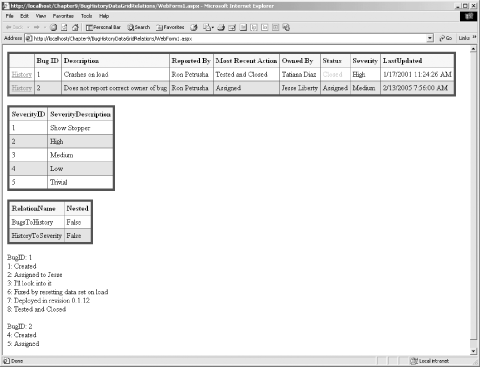 Figure 11-14 shows three grids. The first is created from the Bugs table, as seen in previous examples. The second is created from the lkSeverity table added in this example. The final grid's data source is the Relations table from the dataset. It shows that you've created two relation objects: BugsToHistory and HistoryToSeverity. Below the three grids is the text output produced by walking through the relationships between Bugs and BugHistory. For each Bug (e.g., BugID 1) you see the BugHistory records with that same BugID (e.g, the eight bug History records for BugID 1). The .aspx file is very similar to the previous examples, you have only to add the new grids and the label for output: <asp:DataGrid ID="SeverityGrid" Runat="server" HeaderStyle-Font-Bold="True" AlternatingItemStyle-BackColor="LightGrey" BorderColor="#000099" BorderWidth="5px" HeaderStyle-BackColor="PapayaWhip" CellPadding="5" Runat="server"/> <br> <asp:DataGrid ID="BugRelations" Runat="server" HeaderStyle-Font-Bold="True" AlternatingItemStyle-BackColor="LightGrey" BorderColor="#000099" BorderWidth="5px" HeaderStyle-BackColor="PapayaWhip" CellPadding="5" Runat="server"/> <br> <asp:Label ID="showRelations" Runat="server"></asp:Label> To create the label showing the relationships, you'll work your way through the Bugs table by hand, finding all the related BugHistory items for each of the Bug objects. You iterate through the rows in the Bugs data table. For each row, you create an output string with the BugID, and then you get a collection of the child rows defined by the BugsToHistory relation: DataTable tblBugs = ds.Tables["Bugs"];
foreach (DataRow currentRow in tblBugs.Rows)
{
outputString += "BugID: " + currentRow["BugID"] + "<br/>";
DataRow[] childRows = currentRow.GetChildRows("BugsToHistory");
The childRows DataRow collection contains all the child rows for the current row in the Bugs table. The childRow relationship is established by the DataRelation named BugsToHistory, which established a relationship between the BugID foreign key in BugHistory and the BugID key in Bugs. You can now iterate through that childRows collection, printing whatever information you want to display for each BugHistory record for the current bug: foreach (DataRow historyRow in childRows)
{
outputString += historyRow["BugHistoryID"] + ": " +
historyRow["Response"] + "<br>";
}
When you've iterated through all the rows, you can assign the resulting string to the Text property of the label you've added to your .aspx page: showRelations.Text=outputString; The complete annotated C# source code for the code-behind page is shown in Example 11-8. Example 11-8. Code-behind pageusing System;
using System.Collections;
using System.ComponentModel;
using System.Data;
using System.Data.SqlClient;
using System.Drawing;
using System.Text;
using System.Web;
using System.Web.SessionState;
using System.Web.UI;
using System.Web.UI.WebControls;
using System.Web.UI.HtmlControls;
namespace BugHistoryDataGridRelations
{
/// <summary>
/// Summary description for WebForm1.
/// </summary>
public class WebForm1 : System.Web.UI.Page
{
// the Bugs Data Grid
protected System.Web.UI.WebControls.DataGrid DataGrid1;
// the Data Grid for the history items displayed using
// a filtered view
protected System.Web.UI.WebControls.DataGrid HistoryGrid;
// the Data Grid to show the lkSeverity table
protected System.Web.UI.WebControls.DataGrid SeverityGrid;
// the Data Grid to show the DataRelations you've created
protected System.Web.UI.WebControls.DataGrid BugRelations;
// The panel to hold the history grid
protected System.Web.UI.WebControls.Panel BugHistoryPanel;
// The label for the hand-crafted string showing the
// relation between a Bug and its child History records
protected System.Web.UI.WebControls.Label showRelations;
// unchanged from previous example
public WebForm1( )
{
Page.Init += new System.EventHandler(Page_Init);
}
// unchanged from previous example
public void OnItemDataBoundEventHandler(
Object sender, DataGridItemEventArgs e)
{
ListItemType itemType = (ListItemType)e.Item.ItemType;
if (itemType == ListItemType.Header ||
itemType == ListItemType.Footer ||
itemType == ListItemType.Separator)
return;
if (((DataRowView)e.Item.DataItem).Row.ItemArray[8].ToString( )
== "High")
{
TableCell severityCell = (TableCell) e.Item.Controls[6];
severityCell.ForeColor = Color.FromName("Red");
}
}
// unchanged from previous example
public void OnSelectedIndexChangedHandler(
Object sender, EventArgs e)
{
UpdateBugHistory( );
}
// unchanged from previous example
private void UpdateBugHistory( )
{
int index = DataGrid1.SelectedIndex;
if (index != -1)
{
// get the bug id from the data grid
int bugID = (int) DataGrid1.DataKeys[index];
DataView historyView = (DataView) Session["historyView"];
historyView.RowFilter = "BugID = " + bugID;
HistoryGrid.DataSource = historyView;
HistoryGrid.DataBind( );
BugHistoryPanel.Visible=true;
}
else
{
BugHistoryPanel.Visible=false;
}
}
// build the various tables, views, dataSets and data relations
private void Page_Load(object sender, System.EventArgs e)
{
if (!IsPostBack)
{
// hide the history panel
UpdateBugHistory( );
// call the method which creates the tables and the relations
DataSet ds = CreateDataSet( );
// set the data source for the grid to the first table
DataGrid1.DataSource=ds.Tables[0];
DataGrid1.DataBind( );
// create the DataView and bind to the History grid
DataView historyView = new DataView(ds.Tables[1]);
HistoryGrid.DataSource = historyView;
Session["historyView"] = historyView;
HistoryGrid.DataBind( );
// bind the severity grid to the
SeverityGrid.DataSource=ds.Tables["lkSeverity"];
SeverityGrid.DataBind( );
// bind the BugRelations grid to the Relations collection
BugRelations.DataSource=ds.Relations;
BugRelations.DataBind( );
// create the output string to show the relationship
// between each bug and its related BugHistory records
String outputString = "";
DataTable tblBugs = ds.Tables["Bugs"];
// for each Bug show its bugID and get all the
// related history records
foreach (DataRow currentRow in tblBugs.Rows)
{
outputString += "BugID: " + currentRow["BugID"] + "<br/>";
// the child relationship is created by the BugsToHistory
// data relationship created in CreateDataSet( )
DataRow[] childRows =
currentRow.GetChildRows("BugsToHistory");
// for each historyRow in the child collection
// display the response (current status) field
foreach (DataRow historyRow in childRows)
{
outputString += historyRow["BugHistoryID"] + ": " +
historyRow["Response"] + "<br>";
}
outputString += "<br/>";
}
// update the label
showRelations.Text=outputString;
}
}
// updated to get the lkSeverity table and to create
// two DataRelation objects - one for Bug to BugHistory
// and a second for BugHistory to lkSeverity
private DataSet CreateDataSet( )
{
// connection string to connect to the Bugs Database
string connectionString =
"server=YourServer; uid=sa; pwd=YourPassword; " +
"database=ProgASPDotNetBugs";
// Create connection object, initialize with
// connection string and open the connection
System.Data.SqlClient.SqlConnection connection =
new System.Data.SqlClient.SqlConnection(connectionString);
connection.Open( );
// Create a SqlCommand object and assign the connection
System.Data.SqlClient.SqlCommand command =
new System.Data.SqlClient.SqlCommand( );
command.Connection=connection;
// build the selection statement
StringBuilder s = new StringBuilder(
"Select b.BugID, h.BugHistoryID, b.Description,h.Response, ");
s.Append("o.FullName as owner, ");
s.Append("p.ProductDescription, ");
s.Append("r.FullName as reporter, ");
s.Append("s.StatusDescription, ");
s.Append("sev.SeverityDescription, ");
s.Append("h.DateStamp ");
s.Append("from ");
s.Append(
"(select bugID, max(bugHistoryID) as maxHistoryID ");
s.Append("from BugHistory group by bugID) t ");
s.Append("join bugs b on b.bugid = t.bugid ");
s.Append(
"join BugHistory h on h.bugHistoryID = t.maxHistoryID ");
s.Append("join lkProduct p on b.Product = p.ProductID ");
s.Append("join People r on b.Reporter = r.PersonID ");
s.Append("join People o on h.Owner = o.PersonID ");
s.Append("join lkStatus s on s.statusid = h.status ");
s.Append(
"join lkSeverity sev on sev.SeverityID = h.severity ");
// set the command text to the select statement
command.CommandText=s.ToString( );
// create a data adapter and assign the command object
// and add the table mapping for bugs
SqlDataAdapter dataAdapter = new SqlDataAdapter( );
dataAdapter.SelectCommand=command;
dataAdapter.TableMappings.Add("Table","Bugs");
// Create the dataset and use the data adapter to fill it
DataSet dataSet = new DataSet( );
dataAdapter.Fill(dataSet);
// create a second command object for the bugs history table
System.Data.SqlClient.SqlCommand command2 =
new System.Data.SqlClient.SqlCommand( );
command2.Connection = connection;
// This time be sure to add a column for Severity so that you can
// create a relation to lkSeverity
StringBuilder s2 =
new StringBuilder(
"Select BugID, BugHistoryID, StatusDescription, ");
s2.Append(
"Severity, SeverityDescription, Response,
FullName as Owner, DateStamp ");
s2.Append("from BugHistory h ");
s2.Append("join People o on h.Owner = o.PersonID ");
s2.Append("join lkStatus s on s.statusid = h.status ");
s2.Append(
"join lkSeverity sev on sev.SeverityID = h.severity ");
command2.CommandText= s2.ToString( );
// create a second data adapter and
// add the command and map the table
// then fill the dataset from this second adapter
SqlDataAdapter dataAdapter2 = new SqlDataAdapter( );
dataAdapter2.SelectCommand = command2;
dataAdapter2.TableMappings.Add("Table", "BugHistory");
dataAdapter2.Fill(dataSet);
// create a third command object for the lkSeverity table
System.Data.SqlClient.SqlCommand command3 =
new System.Data.SqlClient.SqlCommand( );
command3.Connection = connection;
StringBuilder s3 =
new StringBuilder(
"Select SeverityID, SeverityDescription from lkSeverity");
command3.CommandText= s3.ToString( );
// create a third data adapter
// and add the command and map the table
// then fill the dataset from this second adapter
SqlDataAdapter dataAdapter3 = new SqlDataAdapter( );
dataAdapter3.SelectCommand = command3;
dataAdapter3.TableMappings.Add("Table", "lkSeverity");
dataAdapter3.Fill(dataSet);
// declare the DataRelation and DataColumn objects
System.Data.DataRelation dataRelation;
System.Data.DataColumn dataColumn1;
System.Data.DataColumn dataColumn2;
// set the dataColumns to create the relationship
// between Bug and BugHistory on the BugID key
dataColumn1 =
dataSet.Tables["Bugs"].Columns["BugID"];
dataColumn2 =
dataSet.Tables["BugHistory"].Columns["BugID"];
dataRelation = new System.Data.DataRelation(
   "BugsToHistory",
   dataColumn1,
   dataColumn2);
// add the new DataRelation to the dataset
dataSet.Relations.Add(dataRelation);
// reuse the DataColumns and DataRelation objects
// to create the relation between BugHistory and lkSeverity
dataColumn1 = dataSet.Tables["lkSeverity"].Columns["SeverityID"];
dataColumn2 = dataSet.Tables["BugHistory"].Columns["Severity"];
dataRelation =
new System.Data.DataRelation(
"HistoryToSeverity",
dataColumn1,
dataColumn2);
// add the HistoryToSeverity relationship to the dataset
dataSet.Relations.Add(dataRelation);
return dataSet;
}
// unchanged from previous example
private void Page_Init(object sender, EventArgs e)
{
InitializeComponent( );
}
#region Web Form Designer generated code
/// <summary>
/// Required method for Designer support - do not modify
/// the contents of this method with the code editor.
/// </summary>
private void InitializeComponent( )
{
this.Load += new System.EventHandler(this.Page_Load);
}
#endregion
}
}
The VB.NET version of the source code is shown in Example 11-9. Example 11-9. Code-behind pageImports System
Imports System.Web
Imports System.Web.UI
Imports System.Web.UI.WebControls
Imports System.Data
Imports System.Data.SqlClient
Imports System.Text
Public Class Example_11_9
Inherits System.Web.UI.Page
#Region " Web Form Designer Generated Code "
'This call is required by the Web Form Designer.
<System.Diagnostics.DebuggerStepThrough()> Private Sub InitializeComponent( )
End Sub
Protected WithEvents DataGrid1 As System.Web.UI.WebControls.DataGrid
Protected WithEvents HistoryGrid As System.Web.UI.WebControls.DataGrid
Protected WithEvents BugHistoryPanel As System.Web.UI.WebControls.Panel
Protected WithEvents SeverityGrid As System.Web.UI.WebControls.DataGrid
Protected WithEvents BugRelations As System.Web.UI.WebControls.DataGrid
Protected WithEvents showRelations As System.Web.UI.WebControls.Label
'NOTE: The following placeholder declaration is required by the Web Form Designer.
'Do not delete or move it.
Private designerPlaceholderDeclaration As System.Object
Private Sub Page_Init(ByVal sender As System.Object, _
ByVal e As System.EventArgs) Handles MyBase.Init
'CODEGEN: This method call is required by the Web Form Designer
'Do not modify it using the code editor.
InitializeComponent( )
End Sub
#End Region
' build the various tables, views, dataSets and data relations
Private Sub Page_Load(ByVal sender As System.Object, _
ByVal e As System.EventArgs) Handles MyBase.Load
If Not IsPostBack Then
' hide the history panel
UpdateBugHistory( )
' call the method which creates the tables and the relations
Dim ds As DataSet = CreateDataSet( )
' set the data source for the grid to the first table
DataGrid1.DataSource = ds.Tables(0)
DataGrid1.DataBind( )
' create the DataView and bind to the History grid
Dim historyView As New DataView(ds.Tables(1))
HistoryGrid.DataSource = historyView
Session("historyView") = historyView
HistoryGrid.DataBind( )
' bind the severity grid to the
SeverityGrid.DataSource = ds.Tables("lkSeverity")
SeverityGrid.DataBind( )
' bind the BugRelations grid to the Relations collection
BugRelations.DataSource = ds.Relations
BugRelations.DataBind( )
' create the output string to show the relationship
' between each bug and its related BugHistory records
Dim outputString As String = ""
Dim tblBugs As DataTable = ds.Tables("Bugs")
' for each Bug show its bugID and get all the
' related history records
Dim currentRow As DataRow
For Each currentRow In tblBugs.Rows
outputString += "BugID: " & currentRow("BugID") & "<br/>"
' the child relationship is created by the BugsToHistory
' data relationship created in CreateDataSet( )
Dim childRows As DataRow( ) = _
currentRow.GetChildRows("BugsToHistory")
' for each historyRow in the child collection
' display the response (current status) field
Dim historyRow As DataRow
For Each historyRow In childRows
outputString += historyRow("BugHistoryID") & ": " & _
historyRow("Response") & "<br>"
Next
outputString += "<br/>"
Next
' update the label
showRelations.Text = outputString
End If
End Sub
' unchanged from previous example
Public Sub DataGrid1_ItemDataBound(ByVal sender As Object, _
ByVal e As System.Web.UI.WebControls.DataGridItemEventArgs) _
Handles DataGrid1.ItemDataBound
Dim myItemtype As ListItemType
myItemtype = CType(e.Item.ItemType, ListItemType)
If (myItemtype = ListItemType.Header) Or _
(myItemtype = ListItemType.Footer) Or _
(myItemtype = ListItemType.Separator) Then
Return
End If
Dim obj As Object = _
CType(e.Item.DataItem, DataRowView).Row.ItemArray(8)
If CType(e.Item.DataItem, DataRowView).Row.ItemArray(8).ToString( ) _
= "High" Then
Dim severityCell As TableCell = CType(e.Item.Controls(6), TableCell)
severityCell.ForeColor = Color.FromName("Red")
End If
End Sub
' updated to get the lkSeverity table and to create
' two DataRelation objects - one for Bug to BugHistory
' and a second for BugHistory to lkSeverity
Private Function CreateDataSet( ) As DataSet
' connection string to connect to the Bugs Database
Dim connectionString As String = "server=YourServer; uid=sa; " + _
"pwd=YourPassword; database=ProgASPDotNetBugs"
' Create connection object, initialize with
' connection string and open the connection
Dim connection As New _
System.Data.SqlClient.SqlConnection(connectionString)
connection.Open( )
' Create a SqlCommand object and assign the connection
Dim command As New System.Data.SqlClient.SqlCommand
command.Connection = connection
' build the selection statement
Dim s As New StringBuilder("Select b.BugID, h.BugHistoryID, _
b.Description,h.Response, ")
s.Append("o.FullName as owner, ")
s.Append("p.ProductDescription, ")
s.Append("r.FullName as reporter, ")
s.Append("s.StatusDescription, ")
s.Append("sev.SeverityDescription, ")
s.Append("h.DateStamp ")
s.Append("from ")
s.Append("(select bugID, max(bugHistoryID) as maxHistoryID ")
s.Append("from BugHistory group by bugID) t ")
s.Append("join bugs b on b.bugid = t.bugid ")
s.Append("join BugHistory h on h.bugHistoryID = t.maxHistoryID ")
s.Append("join lkProduct p on b.Product = p.ProductID ")
s.Append("join People r on b.Reporter = r.PersonID ")
s.Append("join People o on h.Owner = o.PersonID ")
s.Append("join lkStatus s on s.statusid = h.status ")
s.Append("join lkSeverity sev on sev.SeverityID = h.severity ")
' set the command text to the select statement
command.CommandText = s.ToString( )
' create a data adapter and assign the command object
' and add the table mapping for bugs
Dim dataAdapter As New SqlDataAdapter
dataAdapter.SelectCommand = command
dataAdapter.TableMappings.Add("Table", "Bugs")
' Create the dataset and use the data adapter to fill it
Dim DataSet As New DataSet
dataAdapter.Fill(DataSet)
' create a second command object for the bugs history table
Dim command2 As New System.Data.SqlClient.SqlCommand
command2.Connection = connection
' This time be sure to add a column for Severity so that you can
' create a relation to lkSeverity
Dim s2 As New _
StringBuilder("Select BugID, BugHistoryID, StatusDescription, ")
s2.Append("Severity, SeverityDescription, Response, _
FullName as Owner, DateStamp ")
s2.Append("from BugHistory h ")
s2.Append("join People o on h.Owner = o.PersonID ")
s2.Append("join lkStatus s on s.statusid = h.status ")
s2.Append("join lkSeverity sev on sev.SeverityID = h.severity ")
command2.CommandText = s2.ToString( )
' create a second data adapter and
' add the command and map the table
' then fill the dataset from this second adapter
Dim dataAdapter2 As New SqlDataAdapter
dataAdapter2.SelectCommand = command2
dataAdapter2.TableMappings.Add("Table", "BugHistory")
dataAdapter2.Fill(DataSet)
' create a third command object for the lkSeverity table
Dim command3 As New System.Data.SqlClient.SqlCommand
command3.Connection = connection
Dim s3 As New StringBuilder( _
"Select SeverityID, SeverityDescription from lkSeverity")
command3.CommandText = s3.ToString( )
' create a third data adapter
' and add the command and map the table
' then fill the dataset from this second adapter
Dim dataAdapter3 As New SqlDataAdapter
dataAdapter3.SelectCommand = command3
dataAdapter3.TableMappings.Add("Table", "lkSeverity")
dataAdapter3.Fill(DataSet)
' declare the DataRelation and DataColumn objects
Dim dataRelation As System.Data.DataRelation
Dim dataColumn1 As System.Data.DataColumn
Dim dataColumn2 As System.Data.DataColumn
' set the dataColumns to create the relationship
' between Bug and BugHistory on the BugID key
dataColumn1 = DataSet.Tables("Bugs").Columns("BugID")
dataColumn2 = DataSet.Tables("BugHistory").Columns("BugID")
dataRelation = New System.Data.DataRelation("BugsToHistory", _
dataColumn1, dataColumn2)
' add the new DataRelation to the dataset
DataSet.Relations.Add(dataRelation)
' reuse the DataColumns and DataRelation objects
' to create the relation between BugHistory and lkSeverity
dataColumn1 = DataSet.Tables("lkSeverity").Columns("SeverityID")
dataColumn2 = DataSet.Tables("BugHistory").Columns("Severity")
dataRelation = New System.Data.DataRelation("HistoryToSeverity", _
dataColumn1, dataColumn2)
' add the HistoryToSeverity relationship to the dataset
DataSet.Relations.Add(dataRelation)
Return DataSet
End Function
' unchanged from previous example
Public Sub DataGrid1_SelectedIndexChanged(ByVal sender As Object, _
ByVal e As System.EventArgs) Handles DataGrid1.SelectedIndexChanged
UpdateBugHistory( )
End Sub
' unchanged from previous example
Private Sub UpdateBugHistory( )
Dim index As Integer = DataGrid1.SelectedIndex
If index <> -1 Then
Dim bugID As Integer = CType(DataGrid1.DataKeys(index), Integer)
Dim historyView As DataView = _
CType(Session("historyView"), DataView)
historyView.RowFilter = "BugID = " & bugID
HistoryGrid.DataSource = historyView
HistoryGrid.DataBind( )
BugHistoryPanel.Visible = True
Else
BugHistoryPanel.Visible = False
End If
End Sub
End Class
|
|
|
Javascript validator
Javascripts
