

 Javascript validator
Javascripts
Javascript validator
Javascripts
|
|
12.2 Updating Data with TransactionsA very important feature of most industrial-strength databases is support for transactions. A transaction is a set of database operations that must all complete or fail together. That is, either all the operations must complete successfully (commit the transaction), or all must be undone (roll back the transaction) so that the database is left in the state it was in before the transaction began. The canonical transaction is depositing a check. If I write a check to you for $50 and you deposit it, we both expect that once the bank transaction is completed, your account will have increased by $50 and mine will have decreased by $50. Presumably the bank computer accomplishes this in two steps:
If the system fails between steps 1 and 2 or for any reason your account cannot be increased by $50, the transaction should be rolled back; that is, it should fail as a whole (neither account should be affected). If my account is reduced by $50 and your account is not increased, then the database has become corrupted. This should never be allowed, and it is the job of transactions to ensure either that both actions are taken or that neither is.
12.2.1 The ACID TestDatabase designers define the requirements of a transaction in the so-called "ACID" test. ACID is an acronym for Atomic, Consistent, Isolated, and Durable. Here's a brief summary of what each of these terms means:
12.2.2 Implementing TransactionsThere are two ways to implement transactions in ASP.NET. You can allow the database to manage the transaction by using transactions within your stored procedure, or you can use connection-based transactions. In the latter case, the transaction is created and enforced outside of the database. This allows you to add transaction support to databases that do not otherwise provide for it. As Appendix B shows, the Bug database is designed so that each bug event is recorded as one record in Bugs and one or more records in BugHistory. In the next example, you will elicit information from the user about a new bug (e.g., the description, severity, etc.), and you will update both the Bugs table and the BugHistory table. If the update to the BugHistory table fails for any reason, you want to make sure the update to the Bugs table rolls back as well. To ensure this, you wrap these updates in a transaction. In this example, you will offer the user the option to have the transaction implemented either by the database or by the connection, as shown in Figure 12-2. Figure 12-2. Data form for transaction-based add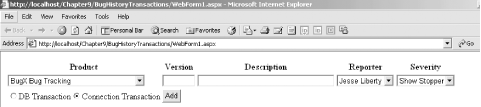 The .aspx file for this form can be found later in Example 12-8. If the user selects DB Transaction, call a stored procedure that implements the transaction semantics. If the user selects Connection Transaction, implement the transaction yourself, using an instance of the System.Data.SqlClient.SqlTransaction class. 12.2.2.1 Database transactionsTo implement the DB Transaction option, you need a stored procedure (or sproc) that adds a record to the Bugs table and a record to the BugsHistory table, using SQL transaction support. CREATE PROCEDURE spAddBugWithTransactions To decide what parameters to provide to this sproc, you must examine the two tables you will update, as shown in Figure 12-3. Figure 12-3. Bugs and BugHistory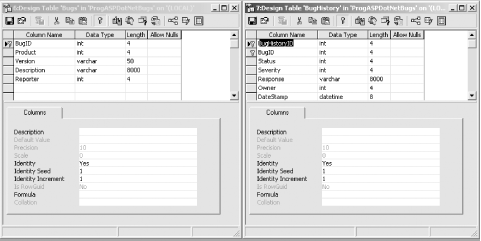 There are 12 fields that must be filled in for the two tables. For Bugs, the required fields are BugID, Product, Version, Description, and Reporter. Note, however, that you don't need to provide a BugID, which is an identity column provided by the database. For BugHistory, the obligatory fields are BugHistoryID, BugID, Status, Severity, Response, Owner, and DateStamp. BugHistoryID is another identity column and is thus provided by the database. Note that BugID must match the BugID generated by Bugs. Thus, rather than passing that into the stored procedure, you'll get it back from the database when you add the Bug record. Status will always be Open (new bugs are always open) and so you need not pass it in. Similarly, Response will always be "Bug Created." To simplify this, we'll assume that when you create a new bug, it is always assigned first to the user (i.e., Owner) whose ID is 1. The DateStamp need not be passed as a parameter, if your table is set up to default to the current date. Thus, you are left passing in just the ProductID, Version, Description, Reporter, and Severity: @ProductID int, @Version varChar(50), @Description varChar(8000), @Reporter int, @Severity int The core of the procedure is a pair of Insert statements. First you will insert values into the Bugs table: Insert into Bugs values (@ProductID, @Version, @Description, @Reporter) The Bugs table has an identity column, which you can retrieve with the SQL keyword @@identity: declare @bugID int select @bugID = @@identity With that bugID in hand, you are ready to insert a record into BugHistory: Insert into BugHistory
(bugID, status, severity, response, owner)
values
( @bugID,
1, -- status
@Severity,
'Bug Created', -- action
1 -- owner
)
Notice that you are hardwiring the status (1 = open), the action (Bug Created) and the owner (6 = a person in QA). To make this all work with database transactions, before the Insert statement that adds a record to the first table, you need only begin with the line: Begin Transaction After the insert, you'll check the @@error value, which should be 0 if the Insert succeeded: if @@Error <> 0 goto ErrorHandler If there is an error, you'll jump to the error handler, where you'll call Rollback Transaction: ErrorHandler: rollback transaction If there is no error, you continue on to the second Insert statement. If there is no error after that insert, you are ready to commit the transaction and exit the sproc: if @@Error <> 0 goto ErrorHandler commit transaction return The net effect is that either both Insert statements are acted on, or neither is. The complete sproc is shown in Example 12-3. Example 12-3. Stored procedure spAddBugWithTransactionsCREATE PROCEDURE spAddBugWithTransactions
@ProductID int,
@Version varChar(50),
@Description varChar(8000),
@Reporter int,
@Severity int
AS
Begin Transaction
declare @bugID int
Insert into Bugs values (@ProductID, @Version, @Description, @Reporter)
select @bugID = @@identity
if @@Error <> 0 goto ErrorHandler
Insert into BugHistory
(bugID, status, severity, response, owner, DateStamp)
values
( @bugID,
1, -- status
@Severity,
'Bug Created', -- action
1, -- owner
GetDate( ) -- DateStamp
)
if @@Error <> 0 goto ErrorHandler
commit transaction
return
ErrorHandler:
rollback transaction
return
GO
With the stored procedure in hand, you are ready to create the ASP.NET page that allows the user to choose a database transaction or a connection-based transaction. You'll start by creating the radio button list in the .aspx page. To do so, drag a RadioButtonList control onto the form, as shown in Figure 12-4. Figure 12-4. The radio button list Set the properties for the buttons as shown in the following code snippet. You can do this from the Property window or by clicking on the HTML tag and updating the HTML directly: <asp:radiobuttonlist id="rbTransaction" Runat="server"
TextAlign="Right" RepeatLayout="flow"
RepeatDirection="Vertical" repeatColumns="2" CellSpacing="3">
<asp:ListItem Text="DB Transaction" Value="0" />
<asp:ListItem Text="Connection Transaction"
Value="1" Selected="True" />
</asp:radiobuttonlist>
You also need controls for the various drop-downs and text fields (shown in the Example 12-8 later in this chapter), as well as a button. <asp:button id="btnAdd" Runat="server" Text="Add"/> When the user clicks the Add button, your button handler is fired. In C#, it takes the form: private void btnAdd_Click(object sender, System.EventArgs e)
{
int whichTransaction =
Convert.ToInt32(rbTransaction.SelectedItem.Value);
if (whichTransaction == 0)
UpdateDBTransaction( );
else
UpdateConnectionTransaction( );
}
In VB.NET, the btnAdd_Click event handler appears as follows: Private Sub btnAdd_Click(sender As Object, e As EventArgs) _
Handles btnAdd.Click
Dim whichTransaction = _
Convert.ToInt32(rbTransaction.SelectedItem.Value)
If whichTransaction = 0 Then
UpdateDBTransaction( )
Else
UpdateConnectionTransaction
End If
End Sub
The entire job of the button handler is to determine which of the two buttons is chosen and to invoke the appropriate method. If the user chooses a database transaction, you will invoke the private UpdateDBTransaction helper method, which in turn will invoke the spAddBugWithTransactions stored procedure. You will create a connection and a command object in the normal way, setting the command object's CommandType property to CommandType.StoredProcedure. You will then create all of the parameters and invoke the stored procedure by calling the ExecuteNonQuery method. There is nothing new or surprising here; all the work to support the transaction is actually done in the stored procedure itself. The C# version of UpdateDBTransaction looks like this: private void UpdateDBTransaction( )
{
// connection string to connect to the Bugs Database
string connectionString =
"server=YourServer; uid=sa; pwd=YourPassword; " +
"database=ProgASPDotNetBugs";
// Create connection object, initialize with
// connection string. Open it.
System.Data.SqlClient.SqlConnection connection =
new System.Data.SqlClient.SqlConnection(connectionString);
connection.Open( );
// create a second command object for the bugs history table
System.Data.SqlClient.SqlCommand command =
new System.Data.SqlClient.SqlCommand( );
command.Connection = connection;
command.CommandText= "spAddBugWithTransactions";
command.CommandType = CommandType.StoredProcedure;
// declare the parameter object
System.Data.SqlClient.SqlParameter param;
// add each parameter and set its direciton and value
param = command.Parameters.Add("@ProductID",SqlDbType.Int);
param.Direction = ParameterDirection.Input;
param.Value = lbProduct.SelectedItem.Value; // from the list box
param = command.Parameters.Add("@Version",SqlDbType.VarChar,50);
param.Direction = ParameterDirection.Input;
param.Value = txtVersion.Text; // from the text box
param = command.Parameters.Add("@Description",SqlDbType.VarChar,8000);
param.Direction = ParameterDirection.Input;
param.Value = txtDescription.Text; // from the text box
param = command.Parameters.Add("@Reporter",SqlDbType.Int);
param.Direction = ParameterDirection.Input;
param.Value = lbReporter.SelectedItem.Value; // from the list box
param = command.Parameters.Add("@Severity",SqlDbType.Int);
param.Direction = ParameterDirection.Input;
param.Value = lbSeverity.SelectedItem.Value; // from the list box
command.ExecuteNonQuery( ); // execute the sproc
}
Here's the same code in VB .NET: Private Sub UpdateDBTransaction( )
' connection string to connect to the Bugs Database
Dim connectionString As String = _
"server=YourServer; uid=sa; pwd=YourPassword" & _
"database=ProgASPDotNetBugs"
' Create connection object, initialize with
' connection string. Open it.
Dim connection As New _
System.Data.SqlClient.SqlConnectionconnectionString)
connection.Open( )
' create a second command object for the bugs history table
Dim command As New _
System.Data.SqlClient.SqlCommand( )
command.Connection = connection
command.CommandText= "spAddBugWithTransactions"
command.CommandType = CommandType.StoredProcedure
' declare the parameter object
Dim param As System.Data.SqlClient.SqlParameter
' add each parameter and set its direciton and value
param = command.Parameters.Add("@ProductID",SqlDbType.Int)
param.Direction = ParameterDirection.Input
param.Value = lbProduct.SelectedItem.Value ' from the list box
param = command.Parameters.Add("@Version",SqlDbType.VarChar,50)
param.Direction = ParameterDirection.Input
param.Value = txtVersion.Text ' from the text box
param = command.Parameters.Add("@Description",SqlDbType.VarChar,8000)
param.Direction = ParameterDirection.Input
param.Value = txtDescription.Text ' from the text box
param = command.Parameters.Add("@Reporter",SqlDbType.Int)
param.Direction = ParameterDirection.Input
param.Value = lbReporter.SelectedItem.Value ' from the list box
param = command.Parameters.Add("@Severity",SqlDbType.Int)
param.Direction = ParameterDirection.Input
param.Value = lbSeverity.SelectedItem.Value ' from the list box
command.ExecuteNonQuery( ) ' execute the sproc
End Sub
12.2.2.2 Connection transactionThe user may choose to use a connection transaction rather than a DB transaction. If so, the method UpdateConnectionTransaction is called. With a Connection transaction there is no transaction support provided by the stored procedure, instead you add the transaction support by creating an SQLTransaction object. For illustration purposes, you'll add to the Bugs table using a stored procedure, but one that does not provide transaction support. You'll add to the BugHistory table using a simple SQL Insert statement. You want the simple update and the stored procedure call to be wrapped inside a transaction, however, to ensure that either both succeed or neither does. To get started, you'll write the spAddBug sproc shown in Example 12-4 to insert a record into Bugs. Example 12-4. The spAddBug stored procedureCREATE PROCEDURE spAddBug @ProductID int, @Version varChar(50), @Description varChar(8000), @Reporter int, @BugID int output AS Insert into Bugs values (@ProductID, @Version, @Description, @Reporter) select @BugID = @@identity You need only those parameters required for the Bugs table; the BugHistory table is not updated by this sproc. In addition, you must add an output parameter, @BugID, to return the identity of the new Bug record, so that you can pass this to the new record in BugHistory. The body of the sproc is nothing more than an Insert statement and a statement to set the @BugID parameter with the new BugID retrieved from the @@identity value. The job of the UpdateConnectionTransaction method, shown in the complete listing below (see Example 12-6) is to invoke both the stored procedure and the SQL Update statement, using a Connection transaction. The steps are as follows:
Example 12-5 shows the complete source code for this example in C#, and Example 12-6 shows it in VB .NET. This code is very similar to the examples in Chapter 11, with the addition of UpdateDBTransaction and UpdateConnectionTransaction, which are shown in bold. Example 12-5. C# Updating with transactionsusing System;
using System.Collections;
using System.ComponentModel;
using System.Data;
using System.Data.SqlClient;
using System.Drawing;
using System.Text;
using System.Web;
using System.Web.SessionState;
using System.Web.UI;
using System.Web.UI.WebControls;
using System.Web.UI.HtmlControls;
namespace BugHistoryTransactions
{
public class WebForm1 : System.Web.UI.Page
{
protected System.Web.UI.WebControls.DataGrid DataGrid1;
protected System.Web.UI.WebControls.DataGrid HistoryGrid;
protected System.Web.UI.WebControls.Panel BugHistoryPanel;
protected System.Web.UI.WebControls.DropDownList lbProduct;
protected System.Web.UI.WebControls.TextBox txtVersion;
protected System.Web.UI.WebControls.TextBox txtDescription;
protected System.Web.UI.WebControls.DropDownList lbSeverity;
protected System.Web.UI.WebControls.Button btnAdd;
protected System.Web.UI.WebControls.DropDownList lbReporter;
protected System.Web.UI.WebControls.RadioButtonList rbTransaction;
private string connectionString =
"server=YourServer; uid=sa; pwd=YourPassword; " & _
"database=ProgASPDotNetBugs";
public WebForm1( )
{
Page.Init += new System.EventHandler(Page_Init);
}
public void OnItemDataBoundEventHandler(
Object sender, DataGridItemEventArgs e)
{
ListItemType itemType = (ListItemType)e.Item.ItemType;
if (itemType == ListItemType.Header ||
itemType == ListItemType.Footer ||
itemType == ListItemType.Separator)
return;
if (e.Item.DataItem == null) return;
if (((DataRowView)e.Item.DataItem).
Row.ItemArray[8].ToString( ) == "High")
{
TableCell severityCell = (TableCell) e.Item.Controls[7];
severityCell.ForeColor = Color.FromName("Red");
}
}
public void OnSelectedIndexChangedHandler(Object sender, EventArgs e)
{
UpdateBugHistory( );
}
private void UpdateBugHistory( )
{
int index = DataGrid1.SelectedIndex;
if (index != -1)
{
// get the bug id from the data grid
int bugID = (int) DataGrid1.DataKeys[index];
// Get a dataset based on that BugID
DataSet dataSet = CreateBugHistoryDataSet(bugID);
// bind to the table returned and make
// the panel visible
HistoryGrid.DataSource = dataSet.Tables[0];
HistoryGrid.DataBind( );
BugHistoryPanel.Visible = true;
}
else
{
// no history to display, hide the panel
BugHistoryPanel.Visible = false;
}
}
private void Page_Load(object sender, System.EventArgs e)
{
if (!IsPostBack)
{
// hide the history panel
UpdateBugHistory( );
// set the data source for the
// grid to the first table
DataSet ds = CreateBugDataSet( );
DataGrid1.DataSource = ds.Tables[0];
DataGrid1.DataBind( );
lbProduct.DataSource = GetDataReader("lkProduct");
lbProduct.DataBind( );
lbSeverity.DataSource = GetDataReader("lkSeverity");
lbSeverity.DataBind( );
lbReporter.DataSource = GetDataReader("People");
lbReporter.DataBind( );
}
}
private SqlDataReader GetDataReader(string whichTable)
{
// Create connection object, initialize with
// connection string. Open it.
System.Data.SqlClient.SqlConnection connection =
new System.Data.SqlClient.SqlConnection(connectionString);
connection.Open( );
// Create a SqlCommand object and assign the connection
System.Data.SqlClient.SqlCommand command =
new System.Data.SqlClient.SqlCommand( );
command.Connection = connection;
// set the stored procedure to get the bug records
command.CommandText = "select * from " + whichTable;
// return the data reader
return command.ExecuteReader(CommandBehavior.CloseConnection);
}
private DataSet CreateBugHistoryDataSet(int bugID)
{
// Create connection object, initialize with
// connection string. Open it.
System.Data.SqlClient.SqlConnection connection =
new System.Data.SqlClient.SqlConnection(connectionString);
connection.Open( );
// create a second command object for the bugs history table
System.Data.SqlClient.SqlCommand command =
new System.Data.SqlClient.SqlCommand( );
command.Connection = connection;
command.CommandText= "spBugHistory";
command.CommandType = CommandType.StoredProcedure;
// declare the parameter object
System.Data.SqlClient.SqlParameter param;
// Add a new parameter, get back a reference to it
param = command.Parameters.Add("@BugID", SqlDbType.Int);
// set the parameter's direction and value
param.Direction = ParameterDirection.Input;
param.Value = bugID;
// create a second data adapter and add the command
// and map the table
// then fill the dataset from this second adapter
SqlDataAdapter dataAdapter = new SqlDataAdapter( );
dataAdapter.SelectCommand = command;
dataAdapter.TableMappings.Add("Table", "BugHistory");
DataSet dataSet = new DataSet( );
dataAdapter.Fill(dataSet);
return dataSet;
}
private DataSet CreateBugDataSet( )
{
// Create connection object, initialize with
// connection string. Open it.
System.Data.SqlClient.SqlConnection connection =
new System.Data.SqlClient.SqlConnection(connectionString);
connection.Open( );
// Create a SqlCommand object and assign the connection
System.Data.SqlClient.SqlCommand command =
new System.Data.SqlClient.SqlCommand( );
command.Connection = connection;
command.CommandText = "spBugs";
command.CommandType = CommandType.StoredProcedure;
// create a data adapter and assign the command object
// and add the table mapping for bugs
SqlDataAdapter dataAdapter = new SqlDataAdapter( );
dataAdapter.SelectCommand = command;
dataAdapter.TableMappings.Add("Table", "Bugs");
// Create the dataset and use the data adapter to fill it
DataSet dataSet = new DataSet( );
dataAdapter.Fill(dataSet);
return dataSet;
}
private void Page_Init(object sender, EventArgs e)
{
InitializeComponent( );
}
#region Web Form Designer generated code
/// <summary>
/// Required method for Designer support - do not modify
/// the contents of this method with the code editor.
/// </summary>
private void InitializeComponent( )
{
this.btnAdd.Click += new System.EventHandler(this.btnAdd_Click);
this.Load += new System.EventHandler(this.Page_Load);
}
#endregion
private void UpdateConnectionTransaction( )
{
// Create connection object, initialize with
// connection string. Open it.
System.Data.SqlClient.SqlConnection connection =
new System.Data.SqlClient.SqlConnection(connectionString);
// declare the command object for the sql statements
System.Data.SqlClient.SqlCommand command =
new System.Data.SqlClient.SqlCommand( );
// declare an instance of SqlTransaction
SqlTransaction transaction;
// connection string to connect to the Bugs Database
connection.Open( );
// begin the transaction
transaction = connection.BeginTransaction( );
// attach the transaction to the command
command.Transaction = transaction;
// attach connection to the command
command.Connection = connection;
try
{
command.CommandText = "spAddBug";
command.CommandType = CommandType.StoredProcedure;
// declare the parameter object
System.Data.SqlClient.SqlParameter param;
// add each parameter and set its direciton and value
param = command.Parameters.Add("@ProductID",SqlDbType.Int);
param.Direction = ParameterDirection.Input;
// from the list box
param.Value = lbProduct.SelectedItem.Value;
param = command.Parameters.Add(
"@Version",SqlDbType.VarChar,50);
param.Direction = ParameterDirection.Input;
// from the text box
param.Value = txtVersion.Text;
param = command.Parameters.Add(
"@Description",SqlDbType.VarChar,8000);
param.Direction = ParameterDirection.Input;
// from the text box
param.Value = txtDescription.Text;
param = command.Parameters.Add("@Reporter",SqlDbType.Int);
param.Direction = ParameterDirection.Input;
// from the list box
param.Value = lbReporter.SelectedItem.Value;
param = command.Parameters.Add("@BugID",SqlDbType.Int);
param.Direction = ParameterDirection.Output;
command.ExecuteNonQuery( ); // execute the sproc
// retrieve the identity column
int BugID =
Convert.ToInt32(command.Parameters["@BugID"].Value);
// formulate the string to update the bug history
string strAddBugHistory = "Insert into BugHistory " +
"(bugID, status, severity, response, owner) values (" + BugID + ",1," +
lbSeverity.SelectedItem.Value + ", 'Bug Created', 1)";
// set up the command object to update the bug hsitory
command.CommandType = CommandType.Text;
command.CommandText = strAddBugHistory;
// execute the insert statement
command.ExecuteNonQuery( );
// commit the transaction
transaction.Commit( );
}
catch (Exception e)
{
Trace.Write(e.Message);
transaction.Rollback( );
}
}
private void UpdateDBTransaction( )
{
// Create connection object, initialize with
// connection string. Open it.
System.Data.SqlClient.SqlConnection connection =
new System.Data.SqlClient.SqlConnection(connectionString);
connection.Open( );
// create a second command object for the bugs history table
System.Data.SqlClient.SqlCommand command =
new System.Data.SqlClient.SqlCommand( );
command.Connection = connection;
command.CommandText= "spAddBugWithTransactions";
command.CommandType = CommandType.StoredProcedure;
// declare the parameter object
System.Data.SqlClient.SqlParameter param;
// add each parameter and set its direciton and value
param = command.Parameters.Add("@ProductID",SqlDbType.Int);
param.Direction = ParameterDirection.Input;
param.Value = lbProduct.SelectedItem.Value; // from the list box
param = command.Parameters.Add("@Version",SqlDbType.VarChar,50);
param.Direction = ParameterDirection.Input;
param.Value = txtVersion.Text; // from the text box
param = command.Parameters.Add(
"@Description",SqlDbType.VarChar,8000);
param.Direction = ParameterDirection.Input;
// from the text box
param.Value = txtDescription.Text;
param = command.Parameters.Add("@Reporter",SqlDbType.Int);
param.Direction = ParameterDirection.Input;
param.Value = lbReporter.SelectedItem.Value; // from the list box
param = command.Parameters.Add("@Severity",SqlDbType.Int);
param.Direction = ParameterDirection.Input;
param.Value = lbSeverity.SelectedItem.Value; // from the list box
command.ExecuteNonQuery( ); // execute the sproc
}
private void btnAdd_Click(object sender, System.EventArgs e)
{
int whichTransaction = Convert.ToInt32(rbTransaction.SelectedItem.Value);
if (whichTransaction == 0)
UpdateDBTransaction( );
else
UpdateConnectionTransaction( );
}
}
}
Example 12-6. VB.NET Updating with transactionsImports System.Data.SqlClient
Namespace BugHistoryTransactions
Public Class WebForm1
Inherits System.Web.UI.Page
Protected DataGrid1 As System.Web.UI.WebControls.DataGrid
Protected HistoryGrid As System.Web.UI.WebControls.DataGrid
Protected BugHistoryPanel As System.Web.UI.WebControls.Panel
Protected lbProduct As System.Web.UI.WebControls.DropDownList
Protected txtVersion As System.Web.UI.WebControls.TextBox
Protected txtDescription As System.Web.UI.WebControls.TextBox
Protected lbSeverity As System.Web.UI.WebControls.DropDownList
Protected WithEvents btnAdd As System.Web.UI.WebControls.Button
Protected lbReporter As System.Web.UI.WebControls.DropDownList
Protected rbTransaction As _
System.Web.UI.WebControls.RadioButtonList
' connection string to connect to the Bugs Database
Private connectionString As String = _
"server=localhost; uid=sa; pwd=; database=ProgASPDotNetBugs"
Public Sub OnItemDataBoundEventHandler( _
ByVal sender As Object, ByVal e As DataGridItemEventArgs)
Dim itemType As ListItemType = CType(e.Item.ItemType, _
ListItemType)
If itemType = ListItemType.Header And _
itemType = ListItemType.Footer And _
itemType = ListItemType.Separator Then
Return
End If
If e.Item.DataItem Is Nothing Then Return
If CType(e.Item.DataItem, _
DataRowView).Row.ItemArray(8).ToString( ) = "High" Then
Dim severityCell As TableCell = _
CType(e.Item.Controls(7), TableCell)
severityCell.ForeColor = Color.FromName("Red")
End If
End Sub
Public Sub OnSelectedIndexChangedHandler( _
ByVal sender As Object, ByVal e As EventArgs)
UpdateBugHistory( )
End Sub
Private Sub UpdateBugHistory( )
Dim index As Integer = DataGrid1.SelectedIndex
If index <> -1 Then
' get the bug id from the data grid
Dim bugID As Integer = _
CType(DataGrid1.DataKeys(index), Integer)
' Get a dataset based on that BugID
Dim dataSet As DataSet = _
CreateBugHistoryDataSet(bugID)
' bind to the table returned and make
' the panel visible
HistoryGrid.DataSource = dataSet.Tables(0)
HistoryGrid.DataBind( )
BugHistoryPanel.Visible = True
Else
' no history to display, hide the panel
BugHistoryPanel.Visible = False
End If
End Sub
Private Sub Page_Load( _
ByVal sender As Object, ByVal e As System.EventArgs) _
Handles MyBase.Load
If Not IsPostBack Then
' hide the history panel
UpdateBugHistory( )
' set the data source for the
' grid to the first table
Dim ds As DataSet = CreateBugDataSet( )
DataGrid1.DataSource = ds.Tables(0)
DataGrid1.DataBind( )
lbProduct.DataSource = GetDataReader("lkProduct")
lbProduct.DataBind( )
lbSeverity.DataSource = GetDataReader("lkSeverity")
lbSeverity.DataBind( )
lbReporter.DataSource = GetDataReader("People")
lbReporter.DataBind( )
End If
End Sub
Private Function GetDataReader(ByVal whichTable As String) _
As SqlDataReader
' Create connection object, initialize with
' connection string. Open it.
Dim connection As New _
System.Data.SqlClient.SqlConnection(connectionString)
connection.Open( )
' Create a SqlCommand object and assign the connection
Dim command As New _
System.Data.SqlClient.SqlCommand
command.Connection = connection
' set the stored procedure to get the bug records
command.CommandText = "select * from " & whichTable
' return the data reader
Return command.ExecuteReader( _
CommandBehavior.CloseConnection)
End Function
Private Function CreateBugHistoryDataSet(ByVal bugID As Integer) _
As DataSet
' Create connection object, initialize with
' connection string. Open it.
Dim connection As New _
System.Data.SqlClient.SqlConnection(connectionString)
connection.Open( )
' Create a SqlCommand object and assign the connection
Dim command As New _
System.Data.SqlClient.SqlCommand
command.Connection = connection
command.CommandText = "spBugHistory"
command.CommandType = CommandType.StoredProcedure
' declare the parameter object
Dim param As System.Data.SqlClient.SqlParameter
' Add a new parameter, get back a reference to it
param = command.Parameters.Add("@BugID", SqlDbType.Int)
' set the parameter's direction and value
param.Direction = ParameterDirection.Input
param.Value = bugID
' create a second data adapter and add the command
' and map the table
' then fill the dataset from this second adapter
Dim dataAdapter As New SqlDataAdapter
dataAdapter.SelectCommand = command
dataAdapter.TableMappings.Add("Table", "BugHistory")
Dim dataSet As New DataSet
dataAdapter.Fill(dataSet)
Return dataSet
End Function
Private Function CreateBugDataSet( ) As DataSet
' Create connection object, initialize with
' connection string. Open it.
Dim connection As New _
System.Data.SqlClient.SqlConnection(connectionString)
connection.Open( )
' Create a SqlCommand object and assign the connection
Dim command As New _
System.Data.SqlClient.SqlCommand
command.Connection = connection
command.CommandText = "spBugs"
command.CommandType = CommandType.StoredProcedure
' create a data adapter and assign the command object
' and add the table mapping for bugs
Dim dataAdapter As New SqlDataAdapter
dataAdapter.SelectCommand = command
dataAdapter.TableMappings.Add("Table", "Bugs")
' Create the dataset and use the data adapter to fill it
Dim dataSet As New DataSet
dataAdapter.Fill(dataSet)
Return dataSet
End Function
#Region " Web Form Designer Generated Code "
'This call is required by the Web Form Designer.
<System.Diagnostics.DebuggerStepThrough()> Private Sub InitializeComponent( )
End Sub
'NOTE: The following placeholder declaration is required by
'the Web Form Designer.
'Do not delete or move it.
Private designerPlaceholderDeclaration As System.Object
Private Sub Page_Init(ByVal sender As System.Object, _
ByVal e As System.EventArgs) Handles MyBase.Init
'CODEGEN: This method call is required by the Web Form Designer
'Do not modify it using the code editor.
InitializeComponent( )
End Sub
#End Region
Private Sub UpdateConnectionTransaction( )
' Create connection object, initialize with
' connection string. Open it.
Dim connection As New _
System.Data.SqlClient.SqlConnection(connectionString)
' Create a SqlCommand object and assign the connection
Dim command As New _
System.Data.SqlClient.SqlCommand
' declare an instance of SqlTransaction
Dim transaction As SqlTransaction
' connection string to connect to the Bugs Database
connection.Open( )
' begin the transaction
transaction = connection.BeginTransaction( )
' attach the transaction to the command
command.Transaction = transaction
' attach connection to the command
command.Connection = connection
Try
command.CommandText = "spAddBug"
command.CommandType = CommandType.StoredProcedure
' declare the parameter object
Dim param As System.Data.SqlClient.SqlParameter
' add each parameter and set its direciton and value
param = command.Parameters.Add("@ProductID", SqlDbType.Int)
param.Direction = ParameterDirection.Input
' from the list box
param.Value = lbProduct.SelectedItem.Value
param = command.Parameters.Add( _
"@Version", SqlDbType.VarChar, 50)
param.Direction = ParameterDirection.Input
' from the text box
param.Value = txtVersion.Text
param = command.Parameters.Add( _
"@Description", SqlDbType.VarChar, 8000)
param.Direction = ParameterDirection.Input
' from the text box
param.Value = txtDescription.Text
param = command.Parameters.Add("@Reporter", SqlDbType.Int)
param.Direction = ParameterDirection.Input
' from the list box
param.Value = lbReporter.SelectedItem.Value
param = command.Parameters.Add("@BugID", SqlDbType.Int)
param.Direction = ParameterDirection.Output
command.ExecuteNonQuery( ) ' execute the sproc
' retrieve the identity column
Dim BugID As Integer = _
Convert.ToInt32(command.Parameters("@BugID").Value)
' formulate the string to update the bug history
Dim strAddBugHistory As String = _
"Insert into BugHistory " & _
"(bugID, status, severity, response, owner) values (" _
& BugID & ",1," & _
lbSeverity.SelectedItem.Value & ", 'Bug Created', 5)"
' set up the command object to update the bug hsitory
command.CommandType = CommandType.Text
command.CommandText = strAddBugHistory
' execute the insert statement
command.ExecuteNonQuery( )
' commit the transaction
transaction.Commit( )
Catch e As Exception
Trace.Write(e.Message)
transaction.Rollback( )
End Try
End Sub
Private Sub UpdateDBTransaction( )
' Create connection object, initialize with
' connection string. Open it.
Dim connection As New _
System.Data.SqlClient.SqlConnection(connectionString)
connection.Open( )
' Create a SqlCommand object and assign the connection
Dim command As New _
System.Data.SqlClient.SqlCommand
command.Connection = connection
command.CommandText = "spAddBugWithTransactions"
command.CommandType = CommandType.StoredProcedure
' declare the parameter object
Dim param As System.Data.SqlClient.SqlParameter
' add each parameter and set its direciton and value
param = command.Parameters.Add("@ProductID", SqlDbType.Int)
param.Direction = ParameterDirection.Input
param.Value = lbProduct.SelectedItem.Value ' from the list box
param = command.Parameters.Add("@Version", _
SqlDbType.VarChar, 50)
param.Direction = ParameterDirection.Input
param.Value = txtVersion.Text ' from the text box
param = command.Parameters.Add( _
"@Description", SqlDbType.VarChar, 8000)
param.Direction = ParameterDirection.Input
' from the text box
param.Value = txtDescription.Text
param = command.Parameters.Add("@Reporter", SqlDbType.Int)
param.Direction = ParameterDirection.Input
param.Value = lbReporter.SelectedItem.Value ' from the list
param = command.Parameters.Add("@Severity", SqlDbType.Int)
param.Direction = ParameterDirection.Input
param.Value = lbSeverity.SelectedItem.Value ' from the list
command.ExecuteNonQuery( ) ' execute the sproc
End Sub
Private Sub btnAdd_Click(ByVal sender As System.Object, _
ByVal e As System.EventArgs) Handles btnAdd.Click
Dim whichTransaction As Integer = _
Convert.ToInt32(rbTransaction.SelectedItem.Value)
If whichTransaction = 0 Then
UpdateDBTransaction( )
Else
UpdateConnectionTransaction( )
End If
End Sub
End Class
End Namespace
The complete source code for the .aspx file is shown in Example 12-7. Again, this is relatively unchanged from the examples in Chapter 11, with the addition of the list boxes, text boxes, and buttons necessary to gather the new Bug data. Example 12-7. The .aspx file<%@ Page language="c#" Codebehind="WebForm1.aspx.cs"
AutoEventWireup="false" Inherits="BugHistoryTransactions.WebForm1" Trace="true"%>
<!DOCTYPE HTML PUBLIC "-//W3C//DTD HTML 4.0 Transitional//EN" >
<HTML>
<HEAD>
<meta name="GENERATOR" content="Microsoft Visual Studio.NET 7.0">
<meta name="CODE_LANGUAGE" content="Visual Basic 7.0">
<meta name="vs_defaultClientScript" content="JavaScript">
<meta name="vs_targetSchema"
content="http://schemas.microsoft.com/intellisense/ie5"> </HEAD>
<body>
<form id="Form1" method="post" runat="server">
<table>
<tr>
<th>Product</th>
<th>Version</th>
<th>Description</th>
<th>Reporter</th>
<th>Severity</th>
</tr>
<tr>
<td>
<asp:dropdownlist id="lbProduct" runat="server"
DataValueField="ProductID"
DataTextField="ProductDescription" />
</td>
<td>
<asp:textbox id="txtVersion" Runat="server" Width="60"/>
</td>
<td>
<asp:textbox id="txtDescription"
Runat="server" Width="250"/>
</td>
<td>
<asp:dropdownlist id="lbReporter" Runat="server"
DataValueField="PersonID" DataTextField="FullName"/>
</td>
<td>
<asp:dropdownlist id="lbSeverity" Runat="server"
DataValueField="SeverityID"
DataTextField="SeverityDescription"/>
</td>
</tr>
<tr>
<td>
<asp:radiobuttonlist id="rbTransaction" Runat="server"
TextAlign="Right" RepeatLayout="flow"
RepeatDirection="Vertical" repeatColumns="2" CellSpacing="3">
   <asp:ListItem Text="DB Transaction" Value="0" />
   <asp:ListItem Text="Connection Transaction"
      Value="1" Selected="True" />
</asp:radiobuttonlist>
</td>
<td>
<asp:button id="btnAdd" Runat="server" Text="Add" />
</td>
</tr>
</table>
<br>
<asp:datagrid id="DataGrid1" runat="server" EnableViewState="true"
AutoGenerateColumns="False" HeaderStyle-Font-Bold="True"
AlternatingItemStyle-BackColor="LightGrey"
OnSelectedIndexChanged="OnSelectedIndexChangedHandler"
OnItemDataBound="OnItemDataBoundEventHandler"
BorderColor="#000099" BorderWidth="5px"
HeaderStyle-BackColor="PapayaWhip" CellPadding="5"
DataKeyField="BugID">
<Columns>
<asp:ButtonColumn Text="History" CommandName="Select" />
<asp:BoundColumn DataField="BugID" HeaderText="Bug ID" />
<asp:BoundColumn DataField="Description"
HeaderText="Description" />
<asp:BoundColumn DataField="Reporter"
HeaderText="Reported By" />
<asp:BoundColumn DataField="Response"
HeaderText="Most Recent Action" />
<asp:BoundColumn DataField="Owner" HeaderText="Owned By" />
<asp:BoundColumn DataField="StatusDescription"
HeaderText="Status" />
<asp:BoundColumn DataField="SeverityDescription"
HeaderText="Severity" />
<asp:BoundColumn DataField="DateStamp"
HeaderText="LastUpdated" />
</Columns>
</asp:datagrid>
<asp:panel id="BugHistoryPanel" Runat="server">
<asp:DataGrid id="HistoryGrid" AutoGenerateColumns="False"
HeaderStyle-Font-Bold AlternatingItemStyle-BackColor="LightGrey"
BorderColor="#000099" BorderWidth="5px"
HeaderStyle-BackColor="PapayaWhip" CellPadding="5" Runat="server">
<Columns>
<asp:BoundColumn DataField="Response"
HeaderText="Most Recent Action" />
<asp:BoundColumn DataField="Owner" HeaderText="Owned By" />
<asp:BoundColumn DataField="StatusDescription"
HeaderText="Status" />
<asp:BoundColumn DataField="SeverityDescription"
HeaderText="Severity" />
<asp:BoundColumn DataField="DateStamp"
HeaderText="LastUpdated" />
</Columns>
</asp:DataGrid>
</asp:panel>
</form>
</body>
</HTML>
 |
|
|
Javascript validator
Javascripts
