|
|
In practical terms, the JAXR information model is based on the ebXML information model. This makes sense from two perspectives: the ebXML v. 2.0 Registry Information Model (RIM) is functionally larger than the UDDI v. 2.0 information model, and developing such detailed models based on community consensus takes time.
As mentioned previously, all the previous discussion about using JAXR and UDDI remains unchanged with an ebXML registry, because of the API's abstraction. In this section, we will discuss how client applications can leverage some of JAXR's level 1 capability features.
 |
The ebXML Registry Service and Registry Information Model specifications can be found at www.oasis-open.org/committees/regrep.
|
One of the significant differences between UDDI and ebXML registries is how client applications are authenticated. While UDDI requires only password-based authentication, the ebXML Registry Service allows for digital certificates to be used in the SOAP headers. The SOAP message in Listing 12.7 shows how the X.509 certificate is included using XML D-Sig specifications.
|
<soap-env:Envelope xmlns:soap-env="http://schemas.xmlsoap.org/soap/envelope/">
<soap-env:Header>
    <ds:Signature xmlns:ds="http://www.w3.org/2000/09/xmldsig#">
    <ds:SignedInfo>
    <ds:CanonicalizationMethod
              Algorithm="http://www.w3.org/TR/2001/REC-xml-c14n-20010315">
        </ds:CanonicalizationMethod>
    <ds:SignatureMethod
              Algorithm="http://www.w3.org/2000/09/xmldsig#dsa-sha1">
           </ds:SignatureMethod>
    <ds:Reference URI="">
    <ds:Transforms>
    <ds:Transform
            Algorithm="http://www.w3.org/2000/09/xmldsig#enveloped-signature">
         </ds:Transform>
    <ds:Transform
         Algorithm="http://www.w3.org/TR/2001/REC-xml-c14n-20010315#WithComments">
           </ds:Transform>
    </ds:Transforms>
    <ds:DigestMethod Algorithm="http://www.w3.org/2000/09/xmldsig#sha1">
         </ds:DigestMethod>
    <ds:DigestValue>bT5BLPViSpaLoRE3fjnH0RpQ6Jw=</ds:DigestValue>
    </ds:Reference>
    </ds:SignedInfo>

    <ds:SignatureValue>YJZAHweU7komyE1p9yOiutWrwZR46/L2GByohkd/b16iVurDQ3ik1g==
            </ds:SignatureValue>
    <ds:KeyInfo>
    <ds:X509Data>
    <ds:X509Certificate>
    MIIC2DCCApYCBD2WJLAwCwYHKoZIzjgEAwUAMFIxDDAKBgNVBAYTA1VTQTEVMBMGA1UEChMMU
    cmNlIEZvcmdlMRAwDgYDVQQLEwdlYnhtbHJyMRkwFwYDVQQDExBSZWdpc3RyeU9wZXJhdG9yM
    DTAyMDkyODIxNTI0OFoXDTAyMTIyNzIxNTI0OFowUjEMMAoGA1UEBhMDVVNBMRUwEwYDVQQKE
    b3VyY2UgRm9yZ2UxEDAOBgNVBAsTB2VieG1scnIxGTAXBgNVBAMTEFJlZ2lzdHJ5T3BlcmF0b
    ggG3MIIBLAYHKoZIzjgEATCCAR8CgYEA/X9TgR11EilS30qcLuzk5/YRt1I870QAwx4/gLZRJ
    XUAiUftZPY1Y+r/F9bow9subVWzXgTuAHTRv8mZgt2uZUKWkn5/oBHsQIsJPu6nX/rfGG/g7V
    qKYVDwT7g/bTxR7DAjVUE1oWkTL2dfOuK2HXKu/yIgMZndFIAccCFQCXYFCPFSMLzLKSuYKi6
    8Fgc9QKBgQD34aCF1ps93su8q1w2uFe5eZSvu/o66oL5V0wLPQeCZ1FZV4661FlP5nEHEIGAt
    cSPoTCgWE7fPCTKMyKbhPBZ6i1R8jSjgo64eK7OmdZFuo38L+iE1YvH7YnoBJDvMpPG+qFGQi
    3+Fa5Z8GkotmXoB7VSVkAUw7/s9JKgOBhAACgYB19I45gtWIml4LIQXNNZS/u43ams5pjzjD9
    dr0voIUc/cWm/odiLnoNj4YNaRKncI8f5o9lQYX4y4QGusbVLVVUd7u4Xby50seu0nvAxh9//
    BHaQgHA/JTvatcmZwjXqqpZyBYrEYfXpHAFTY6fLJFKpp31Ai045gcXGIzALBgcqhkjOOAQDB
    LwAwLAIUYODY/SLIho4PAllVC4ZnCavE57cCFCtmGUi+oFftL8m29PdZqkW4XMKl
    </ds:X509Certificate>
    </ds:X509Data>
    <ds:KeyValue>
    <ds:DSAKeyValue>
    <ds:P>
    /X9TgR11EilS30qcLuzk5/YRt1I870QAwx4/gLZRJmlFXUAiUftZPY1Y+r/F9bow9subVWzXg
    HTRv8mZgt2uZUKWkn5/oBHsQIsJPu6nX/rfGG/g7V+fGqKYVDwT7g/bTxR7DAjVUE1oWkTL2d
    K2HXKu/yIgMZndFIAcc=
    </ds:P>
    <ds:Q>l2BQjxUjC8yykrmCouuEC/BYHPU=</ds:Q>
    <ds:G>
    9+GghdabPd7LvKtcNrhXuXmUr7v6OuqC+VdMCz0HgmdRWVeOutRZT+ZxBxCBgLRJFnEj6EwoF
    zwkyjMim4TwWeotUfI0o4KOuHiuzpnWRbqN/C/ohNWLx+2J6ASQ7zKTxvqhRkImog9/hWuWfB
    Zl6Ae1UlZAFMO/7PSSo=
    </ds:G>
    <ds:Y>
    dfSOOYLViJpeCyEFzTWUv7uN2prOaY84w/QlTHa9L6CFHP3Fpv6HYi56DY+GDWkSp3CPH+aPZ
    +MuEBrrG1S1VVHe7uF28udLHrtJ7wMYff/w9KgR2kIBwPyU72rXJmcI16qqWcgWKxGH16RwBU
    yyRSqad9QItOOYHFxiM=
    </ds:Y>
    </ds:DSAKeyValue>
    </ds:KeyValue>
    </ds:KeyInfo>
    </ds:Signature>
</soap-env:Header>
<soap-env:Body>
    <SubmitObjectsRequest
            xmlns="urn:oasis:names:tc:ebxml-regrep:registry:xsd:2.1">
    <LeafRegistryObjectList>
       <RegistryPackage id="urn:uuid:bfef9997-508d-4131-a826-edebc7a47836" objectType=
                                                                    "RegistryPackage">
    <Name>
            <LocalizedString charset="UTF-8" lang="en-us"
            value="Flute Bank Agreements">
             </LocalizedString>
    </Name>
    <Description>
          <LocalizedString charset="UTF-8" lang="en-us" value="">
     </LocalizedString>
    </Description>
    </RegistryPackage>
    </LeafRegistryObjectList>
    </SubmitObjectsRequest>
</soap-env:Body>
</soap-env:Envelope>
|
Let us look at how a client can publish Organization information in the ebXML registry using JAXR. Listing 12.8 shows how the JAXR provider for ebXML (available under open source) can be used. The example is identical to Listing 12.1, which published the information to a UDDI registry. The only difference is the manner in which the connection is passed the user's credentials for authentication. Instead of a username and password, the user sends the X.509 certificate.
|
import java.security.*;
import java.security.cert.X509Certificate;
// other imports

public class ebXMLPublishOrg {

public static void main (String args[]){
// keystore location and alias

// Start JAXR provider imsplementation specific code
    String alias = "mykey";
    String location="c:/temp/rr/jaxr/keystore.jks";
    String storepass="ebxmlrr";
    String keypass="password";
HashSet creds = new HashSet();
// get the keystore
KeyStore keyStore = KeyStore.getInstance("JKS");
keyStore.load(new FileInputStream(location), storepass.toCharArray());
X509Certificate cert =(X509Certificate)keyStore.getCertificate(alias);
PrivateKey privateKey=
(PrivateKey)keyStore.getKey(alias,keypass.toCharArray());
   X500PrivateCredential credential=
                             new X500PrivateCredential(cert,privateKey,alias);
// End  JAXR provider implementation specific code
    creds.add(credential);
// Create the connection factory, which can be set by the system property
//-Djavax.xml.registry.ConnectionFactoryClass=
//                   com.sun.xml.registry.ebxml.ConnectionFactoryImpl
 ConnectionFactory factory = ConnectionFactory.newInstance();
 Connection connection = connFactory.createConnection();
 connection.setCredentials(creds);
// create organization and other objects with BusinessLifeCyleManager and
// use the BusinessLifeCyleManager.saveOrganizations(orgs) method
      }
}
|
|
Digital certificates are based on public-key crytography, in which an individual is issued a private and a public key. X.509 is a widely used industry standard maintained by the International Telecommunications Union (ITU). It is used in various code-signing schemes, (e.g., signed JAR files and Microsoft Authenticode) and protocols such as secure email (PEM and S/MIME) and SSL. The certificate contains information about the issuer, the validity period, the subject's distinguished name (e.g., CN=John Malkovich, OU=Billing Department, O=Flute Bank, C=US) and the subject's public key.
Typically, authentication is performed by the user's sending the X.509 certificate containing the public key. The server sends a challenge back to the user that contains a randomly generated sequence of characters. The user then encrypts it with the private key and returns the encrypted string to the server. If the encrypted string can be successfully decrypted using the public key supplied in the certificate, the server can be sure the user is in possession of the private key and is the person to whom the certificate was issued.
Working with X.509 Certificates
The JDK comes with a the tool called keytool that can be used to create public-private key pairs; display, import, and export X.509 v. 1, v. 2, and v. 3 certificates stored as files; and generate new self-signed v. 1 certificates. keytool also manages the keystore, which is a protected database that holds keys and certificates. The API for using these certificates in Java is included in the core package, ava.security.cert.
|
One of the advantages of using an ebXML registry is that it can store arbitrary content, such as business process descriptions (BPML documents), and business agreements, such as the CPP and CPA agreements used in ebXML messaging systems. This is different from storing WSDL in UDDI, in the sense that the actual business document is stored in the repository, which the registry service exposes. For example, the code in Listing 12.3 publishes a URL only to the WSDL document, whereas in an ebXML registry, the actual WSDL document may be published to the registry. In this sense, the ebXML registry plays a sort of content management role.
In JAXR, the ExtrinsicObject is used to model the metadata representing such content. Let us look at some code extracts that show how this can be used. Flute Bank can choose to store its CPP/CPA with OfficeMin as the following code shows.
// Create a connection and authenticate with the registry
// Obtain the BusinessLifeCyleManager instance from the connection
// Now get the XML file
URL url = getClass().getResource("/agreements/officemin.xml");
DataHandler handler = new DataHandler(url);
// Create an ExtrinsicObject
ExtrinsicObject obj = lifecyclemgr.createExtrinsicObject(handler);
obj.setRepositoryItem(handler);
// Save the arbitrary content
Collection data = new ArrayList();
data.add(obj);
BulkResponse response = lifecyclemgr.saveObjects(data);
if(response.getStatus()==BulkResponse.STATUS_SUCCESS){
    System.out.println("CPP successfully saved");
     System.out.println("ID is :+obj.getKey().getId()");
        }
Note that in the above example, the resource can be any arbitrary content, such as graphic files, XML schemas, or Word documents.
In practical terms, content will be grouped into RegistryPackage objects that can be associated with any RegistryObject. RegistryPackages are a powerful level 1 feature. Any registry object can have multiple RegistryPackages associated with it and can also be associated with multiple packages. Therefore, business documents such as privacy policies, grouped under a package named "Policies" and associated with an Organization, can be retrieved as shown below:
// Locate the Organization
   BulkResponse response =  querymgr.findOrganizations(findqualifier,
                                      searchpattern, null, null, null,
// Iterate and get to the individual Organization
    Organization org =  (Organization) orgiterator.next();
     Collection packages =org.getRegistryPackages();
// Iterate and get to the package we are interested in
   if(package.getName().getValue().equals("Policies"){
        Collection extobjects=package.getRegistryObjects();
//  Iterate and get individual ExtrinsicObject elements
          ExtrinsicObject obj=eoiter.next();
// get underlying content
          DataHandler handler= obj.getRepositoryItem();
Documents such as the CPP and CPA, which relate to the Service, can also be queried and stored in a similar manner under the associated Service object (which is also an instance of a RegistryObject).
As a general programming note, while interacting with the ebXML registry, client applications will rely more on the generic methods defined in the LifeCycleManager rather than the subclass BusinessLifeCycleManager to create and save objects. Similarly, they will rely more on the declarative queries and the DeclarativeQueryManager looked at earlier to find data in the registry, as opposed to the BusinessQueryManager looked at for UDDI.
Let us look at a complete example of publishing information to an ebXML registry, using the open source JAXR provider and ebXML registry implementation. We have slightly modified the UDDI example from Listing 12.1, for two reasons: the ebXML registry has tighter validation rules than UDDI (e.g., a contact person for an Organization is required), and we wanted to show the use of some level 1 capabilities.
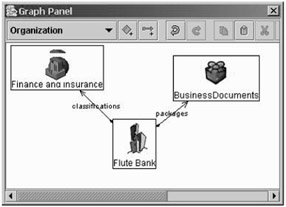
Listing 12.9 publishes Flute Bank's information, its BillPay service information, some associated documents (we will use Flute's BPSS and CPA XML documents used in Chapter 7), and creates a package object in the registry and an association. For the sake of brevity, we have not included the SOAP messages exchanged between the client and the registry. Upon successful execution, the results can be viewed using the graphical registry browser, as Figure 12.19 shows.
|
import javax.xml.registry.infomodel.*;
import javax.xml.registry.*;
import java.util.*;
import java.net.URL;
import javax.activation.*;
import java.security.*;
import java.io.FileInputStream;
import java.security.cert.X509Certificate;
import javax.security.auth.x500.X500PrivateCredential;

public class ebXMLPublishOrg{
  private static final String QUERY_URL= "http://localhost:9090/ebxmlrr/registry";
  private static final String PUBLISH_URL="http://localhost:9090/ebxmlrr/registry";
  public static void main(String[] args) throws Exception {
// Set the properties for the ConnectionFactory
Properties environment = new Properties();
environment.setProperty("javax.xml.registry.queryManagerURL", QUERY_URL);
environment.setProperty("javax.xml.registry.lifeCycleManagerURL", PUBLISH_URL);

// Instantiate the factory and create a connection from it
    ConnectionFactory connfactory = ConnectionFactory.newInstance();
    connfactory.setProperties(environment);
    Connection conn = connfactory.createConnection();
// Authenticate the username and password with the registry

/////////////// Start JAXR provider implementation-specific code
    String alias = "mykey";
    String location="c:/temp/rr/jaxr/keystore.jks";
    String storepass="ebxmlrr";
    String keypass="password";
    HashSet creds = new HashSet();
// get the keystore
  KeyStore keyStore = KeyStore.getInstance("JKS");
    keyStore.load(new FileInputStream(location), storepass.toCharArray());

  X509Certificate cert =(X509Certificate)keyStore.getCertificate(alias);
  PrivateKey privateKey =
                     (PrivateKey)keyStore.getKey(alias,keypass.toCharArray());
  X500PrivateCredential credential=
                           new X500PrivateCredential(cert,privateKey,alias);
    creds.add(credential);
//////////////  END JAXR provider implementation-specific code
    conn.setCredentials(creds);

// Obtain a reference to the RegistryService, the BusinessLifeCycleManager, and
// the BusinessQueryManager
RegistryService registryservice = conn.getRegistryService();
BusinessLifeCycleManager lifecyclemgr =
                             registryservice.getBusinessLifeCycleManager();
BusinessQueryManager querymgr = registryservice.getBusinessQueryManager();

// Create a user object
User contact = lifecyclemgr.createUser();
PersonName name = lifecyclemgr.createPersonName("John Malkovich");
contact.setPersonName(name);
InternationalString contactdescription = lifecyclemgr.createInternationalString
                                ("The primary contact person for Flute Web services");
contact.setDescription(contactdescription);

// Create and set the user's telephone number
TelephoneNumber telnum = lifecyclemgr.createTelephoneNumber();
telnum.setNumber("1-800-FLUTE-US");
Collection phonenumbers = new ArrayList();
phonenumbers.add(telnum);
contact.setTelephoneNumbers(phonenumbers);

// Create and set the user's email address
EmailAddress email =  lifecyclemgr.createEmailAddress(
                                                "ebxml-admin@flutebank.com");
Collection emaillist = new ArrayList();
emaillist.add(email);
contact.setEmailAddresses(emaillist);

PostalAddress addr = lifecyclemgr.createPostalAddress("64"," Bit
                       Street"," Windsor"," CT"," USA","03060"," Office Address");
ArrayList addresses = new ArrayList();
addresses.add(addr);
contact.setPostalAddresses(addresses);
// Create an organization object
Organization company =   lifecyclemgr.createOrganization("Flute Bank");
InternationalString description = lifecyclemgr.createInternationalString
                       "A fictitious bank used for examples in the book Java Web
Services Architecture, published by Morgan Kaufman, ISBN 1-55860-900-8. The authors
can be reached at webservicesbook@yahoogroups.com OR
www.javawebservicesarchitecture.com. ");
company.setDescription(description);

// Set the user as the primary contact for the organization. User's address and
// company address are same
company.setPrimaryContact(contact);
company.setPostalAddress(addr);
company.setTelephoneNumbers(phonenumbers);

ExternalLink website = lifecyclemgr.createExternalLink("http://www.flutebank.com",
"Flute Bank Inc");
website.setValidateURI(false);
company.addExternalLink(website);

// We now have the objects representing our information model
// To publish it, we must classify it. We decide to use the
//  NAICS scheme
ClassificationScheme scheme =
              querymgr.findClassificationSchemeByName(null," ntis-gov:naics");

// Create the classification using the above scheme and pass the relevant
// category code and description

Classification classification =
(Classification)lifecyclemgr.createClassification(scheme,"Finance and Insurance", "52");
Collection classificationlist = new ArrayList();
classificationlist.add(classification);
company.addClassifications(classificationlist);

// Create the concrete service (this maps to the businessService)
Service service = lifecyclemgr.createService("Billpayservice");
company.addService(service);
InternationalString servicedescription =
                                     lifecyclemgr.createInternationalString("A Web
                               service allowing account holders to pay bills online");
service.setDescription(servicedescription);

ExternalLink link1 = lifecyclemgr.createExternalLink
 ("http://127.0.0.1:8080/billpayservice/billpayservice.wsdl", "Service WSDL");
link1.setValidateURI(false);
service.addExternalLink(link1);

// Create the service bindings for the Web service
ServiceBinding binding = lifecyclemgr.createServiceBinding();
binding.setValidateURI(false);
InternationalString bindingdescription =
    lifecyclemgr.createInternationalString("HTTP bindings for the Billpayservice Web
                                                                            service");
binding.setDescription(bindingdescription);
// replace with the actual URL where the service is deployed
binding.setAccessURI("http://127.0.0.1:8080/billpayservice/jaxrpc/BillPay");
service.addServiceBinding(binding);

DataHandler upload1 = new DataHandler(new FileDataSource("C:/rr/jaxr/build/test/
classes/bpss.xml"));
DataHandler upload2 = new DataHandler(new FileDataSource("C:/rr/jaxr/build/test/
classes/cpa.xml"));

// Create an ExtrinsicObject
ExtrinsicObject obj1 = lifecyclemgr.createExtrinsicObject(upload1);
ExtrinsicObject obj2 = lifecyclemgr.createExtrinsicObject(upload2);

RegistryPackage docs =lifecyclemgr.createRegistryPackage("BusinessDocuments");
docs.addRegistryObject(obj1);
docs.addRegistryObject(obj2);

Concept assType = querymgr.findConceptByPath("/AssociationType/packages");
Association ass = lifecyclemgr.createAssociation(docs, assType);
company.addAssociation(ass);
// make the final call to the registry and get a response
// This could have been used instead
//BulkResponse response = lifecyclemgr.saveOrganizations(organizationlist);
// We show the more general method below

ArrayList objs = new ArrayList();
objs.add(company);
objs.add(service);
objs.add(binding);
objs.add(contact);
objs.add(docs);
objs.add(website);

BulkResponse response = lifecyclemgr.saveObjects(objs);
if (response.getStatus()==JAXRResponse.STATUS_SUCCESS)
        System.out.println("The request was processed successfully");
// Finally, close the connection
conn.close();
    }
}
|
No mapping is required from the JAXR model to the ebXML Registry Information Model, because they are identical (e.g., Organization interface in JAXR maps to an Organization object in RIM, etc.) Also, JAXR supports all features and functionality defined by OASIS for the ebXML registry.
|
|