JavaScript Editor
JavaScript Debugger
JavaScript Editor
JavaScript Debugger|
| ||
There are various ways to use panels (see "Adding Controls at Run Time" in Chapter 15 to see how to use panels as containers that the code adds controls to). The Panels example on the CD-ROM also puts a couple of panels to work, as discussed in the In Depth section of this chapter, by letting the user select a color and displaying that color in a panel. You can see this example at work in Figures 16.4 and 16.5.
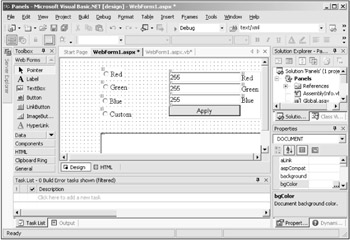
You can add a panel to a Web application as you would any other Web server control; just use the Web Forms tab in the toolbox, and add the panel to a Web form. When you create a panel, the text "Panel" appears in it; to remove this text, you don't use the Text property (there isn't one)—you just select the text in the panel and delete it. You can add controls to a panel just by dragging them on top of the panel (or by using the Controls collection's Add method—see "Adding Controls at Run Time" in Chapter 15). As you can see in Figure 16.10, I've added three text boxes, a set of labels ("Red", "Green", and "Blue"), as well as a button, to a panel, Panel2 (Panel1 appears at the bottom of the application, and, as discussed in the In Depth section of this chapter, this where the new color the user has selected appears, using the panel's BackColor property).
The user can select colors in this example by clicking one of the Red, Green, or Blue radio buttons, but they also can click the Custom radio button to display the controls in the panel (see Figure 16.5). That's done very simply—all I have to do is to set the panel's Visible property to True to display it, and False to hide it:
    Private Sub RadioButton4_CheckedChanged(ByVal sender As _
        System.Object, ByVal e As System.EventArgs) Handles _
        RadioButton4.CheckedChanged
        If CType(sender, RadioButton).Checked Then
            Panel2.Visible = True
        Else
            Panel2.Visible = False
        End If
    End Sub
That's all it takes. Here's the Panels example's code in WebForm1.aspx:
<%@ Page Language="vb" AutoEventWireup="false"
Codebehind="WebForm1.aspx.vb" Inherits="Panels.WebForm1"%>
<!DOCTYPE HTML PUBLIC "-//W3C//DTD HTML 4.0 Transitional//EN">
<HTML>
  <HEAD>
    <title>Panels example</title>
    <meta name="GENERATOR" content="Microsoft Visual Studio.NET 7.0">
    <meta name="CODE_LANGUAGE" content="Visual Basic 7.0">
    <meta name=vs_defaultClientScript content="JavaScript">
    <meta name=vs_targetSchema
        content="http://schemas.microsoft.com/intellisense/ie5">
  </HEAD>
  <body MS_POSITIONING="GridLayout">

    <form id="Form1" method="post" runat="server">
<asp:Panel id=Panel1 style="Z-INDEX: 101; LEFT: 92px; POSITION:
absolute; TOP: 161px" runat="server" Width="346px" Height="90px"
BorderStyle="Solid" BorderWidth="1px"></asp:Panel>
<asp:RadioButton id=RadioButton4 style="Z-INDEX: 106; LEFT: 91px;
POSITION: absolute; TOP: 110px" runat="server" GroupName="ColorGroup"
Text="Custom" AutoPostBack="True"></asp:RadioButton>
<asp:RadioButton id=RadioButton3 style="Z-INDEX: 105; LEFT: 91px;
POSITION: absolute; TOP: 82px" runat="server" GroupName="ColorGroup"
Text="Blue" AutoPostBack="True"></asp:RadioButton>
<asp:RadioButton id=RadioButton2 style="Z-INDEX: 104; LEFT: 92px;
POSITION: absolute; TOP: 52px" runat="server" GroupName="ColorGroup"
Text="Green" AutoPostBack="True"></asp:RadioButton>
<asp:RadioButton id=RadioButton1 style="Z-INDEX: 103; LEFT: 93px;
POSITION: absolute; TOP: 24px" runat="server" GroupName="ColorGroup"
Text="Red" AutoPostBack="True"></asp:RadioButton>
<asp:Panel id=Panel2 style="Z-INDEX: 102; LEFT: 239px; POSITION:
absolute; TOP: 29px" runat="server" Width="198px" Height="102px"
Visible="False">
<asp:TextBox id=TextBox1 runat="server">255</asp:TextBox>
<asp:Label id=Label1 runat="server">Red</asp:Label>
<asp:TextBox id=TextBox2 runat="server">255</asp:TextBox>
<asp:Label id=Label2 runat="server">Green</asp:Label>
<asp:TextBox id=TextBox3 runat="server">255</asp:TextBox>
<asp:Label id=Label3 runat="server">Blue</asp:Label>
<asp:Button id=Button1 runat="server" Width="154px" Height="24px"
Text="Apply"></asp:Button></asp:Panel>

    </form>
  </body>
</HTML>
And here's what WebForm1.aspx.vb looks like in this example:
Public Class WebForm1
    Inherits System.Web.UI.Page
    Protected WithEvents Panel1 As System.Web.UI.WebControls.Panel
    Protected WithEvents RadioButton1 As _
        System.Web.UI.WebControls.RadioButton
    Protected WithEvents RadioButton2 As _
        System.Web.UI.WebControls.RadioButton
    Protected WithEvents RadioButton3 As _
        System.Web.UI.WebControls.RadioButton
    Protected WithEvents RadioButton4 As _
        System.Web.UI.WebControls.RadioButton
    Protected WithEvents TextBox1 As System.Web.UI.WebControls.TextBox
    Protected WithEvents Label1 As System.Web.UI.WebControls.Label
    Protected WithEvents TextBox2 As System.Web.UI.WebControls.TextBox
    Protected WithEvents Label2 As System.Web.UI.WebControls.Label
    Protected WithEvents TextBox3 As System.Web.UI.WebControls.TextBox
    Protected WithEvents Label3 As System.Web.UI.WebControls.Label
    Protected WithEvents Button1 As System.Web.UI.WebControls.Button
    Protected WithEvents Panel2 As System.Web.UI.WebControls.Panel

#Region " Web Form Designer Generated Code "

    'This call is required by the Web Form Designer.
    <System.Diagnostics.DebuggerStepThrough()> _
        Private Sub InitializeComponent()

    End Sub
    Private Sub Page_Init(ByVal sender As System.Object, ByVal e As _
        System.EventArgs) Handles MyBase.Init
        'CODEGEN: This method call is required by the Web Form Designer
        'Do not modify it using the code editor.
        InitializeComponent()
    End Sub

#End Region

    Private Sub RadioButton1_CheckedChanged(ByVal sender As _
        System.Object, ByVal e As System.EventArgs) Handles _
        RadioButton1.CheckedChanged
        If CType(sender, RadioButton).Checked Then
            Panel1.BackColor = Color.Red
        End If
    End Sub

    Private Sub RadioButton2_CheckedChanged(ByVal sender As _
        System.Object, ByVal e As System.EventArgs) Handles _
        RadioButton2.CheckedChanged
        If CType(sender, RadioButton).Checked Then
            Panel1.BackColor = Color.Green
        End If
    End Sub

    Private Sub RadioButton3_CheckedChanged(ByVal sender As _
        System.Object, ByVal e As System.EventArgs) Handles _
        RadioButton3.CheckedChanged
        If CType(sender, RadioButton).Checked Then
            Panel1.BackColor = Color.Blue
        End If
    End Sub

    Private Sub RadioButton4_CheckedChanged(ByVal sender As _
        System.Object, ByVal e As System.EventArgs) Handles _
        RadioButton4.CheckedChanged
        If CType(sender, RadioButton).Checked Then
            Panel2.Visible = True
        Else
            Panel2.Visible = False
        End If
    End Sub

    Private Sub Button1_Click(ByVal sender As System.Object, _
        ByVal e As System.EventArgs) Handles Button1.Click
        Panel1.BackColor = Color.FromArgb(TextBox1.Text, _
            TextBox2.Text, TextBox3.Text)
    End Sub

    Private Sub Page_Load(ByVal sender As System.Object, ByVal e _
        As System.EventArgs) Handles MyBase.Load

    End Sub
End Class
|
Related solution: |
Found on page: |
|---|---|
|
692 |
|
| ||
Free JavaScript Editor
JavaScript Editor