JavaScript Editor
JavaScript Debugger
JavaScript Editor
JavaScript Debugger|
| ||
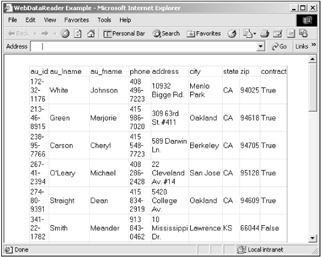
As with Windows forms, you can use data readers to access data, not just datasets (see "Using a Data Reader" in Chapter 22 for more on data readers). To see how this works, see the WebDataReader example on the CD-ROM. In that example, I use an OleDbCommand object to retrieve the authors table and connect that table to a data grid. Here's the code—note that you use the ExecuteReader method of the command object to get the data reader:
Private Sub Page_Load(ByVal sender As System.Object, _
    ByVal e As System.EventArgs) Handles MyBase.Load
    OleDbConnection1.Open()
    Dim Reader1 As System.Data.OleDb.OleDbDataReader
    Reader1 = OleDbCommand1.ExecuteReader()
    DataGrid1.DataSource = Reader1
    DataGrid1.DataBind()
    Reader1.Close()
End Sub
You can see the results in Figure 23.12, where the data from the data reader is displayed in the data grid in this example.
|
Related solution: |
Found on page: |
|---|---|
|
968 |
|
| ||
Free JavaScript Editor
JavaScript Editor